When to Build vs Buy for AI Demo Software

When it’s time to pull product analytics, build a deck, or write an announcement blog post, most folks instinctively reach for Claude or ChatGPT.
Why would creating demo assets be any different?
Well, demos aren’t a one-and-done kind of deliverable. Your features change, your UI changes, company branding changes. Can a few cobbled-together AI tools keep up?
To see how teams are navigating this decision, we consulted buyer interviews from GetWhys (across PMMs, SEs, and other cross-functional teams) to understand why teams choose to build.
Here’s a look at what a typical AI-DIY workflow looks like today, where it hits a wall, and a framework for pressure-testing your decision to build or buy demo software.
Why Product Marketers and SEs Would Build In-House
Besides being conditioned to use AI every day for everything, there are good reasons PMMs and SEs default to building their own sales demo software.
According to the GetWhys data:
- They have a highly custom product, data, or sales motion, and they’re worried that off-the-shelf tools can’t adapt to it.
- They are skeptical that a demo platform adds real value. Particularly if they already have trouble spinning up and maintaining demo sandboxes (a big challenge for data-heavy or enterprise products).
- They don’t want to worry about security and architecture objections. Some enterprise customers will not buy a solution without doing deep product discovery themselves (aka running a POC).
- They don’t want to pay. They’re afraid that sales demo software pricing models will cause their budget to spin out of control. Several interviewees said they “actively avoid” tools with unpredictable usage-based pricing and favor models they can “budget tightly.”
- They don’t want to go through a long implementation. Why pay (in time, resources, budget) for months of setup and integration on top of a platform?
The New Pattern of Building With AI Tools
A few trends emerged when we took a deeper dive into how SE and PMM teams use LLMs for demos. From the GetWhys research, they used AI to:
Reduce Prep Work
The refrain we kept seeing in the data was that people were using LLMs to speed up prep work – not to actually build demos.
They used AI to:
- Generate sample files
- Come up with industry-specific scenarios and use cases
- Do company research
Some SEs even use AI to mine RFPs for themes to keep top of mind in a disco call. Per solutions engineer Muskan Jindal:
“I use AI to surface features the company did not explicitly ask about in the RFP, but could be extremely helpful to bring up in a discovery call, given what else they’ve revealed.
For example, ‘Questions 4, 5, 23, and 54 indicate an opportunity to bring up feature xyz.’ It’s on me to figure out if the AI’s take is right, and then prepare some good questions for discovery.”
All of these shortcuts help reduce the turnaround time for more customized live demos.
Produce Video Content
Some teams used AI to take a rough product walkthrough video, recorded in something like Loom, and convert it into multiple tailored demos or scripts.
For the most part, they used lightweight, personalized video tools to send couple-minute videos with inserted fields (‘Hey [prospect name], saw you were interested in our payment processing engine, so thought I’d send you a video…’), instead of full-blown demo software.
Spin Up Demo Data
In our research, teams used ChatGPT to create dummy industry-specific data, names, and workflow combinations.
Then, they manually formatted them into spreadsheets and uploaded them to their demo environment.
As of the beginning of 2026, most SEs (41%) were still manually updating demo environments, so data creation is a great use case for AI.
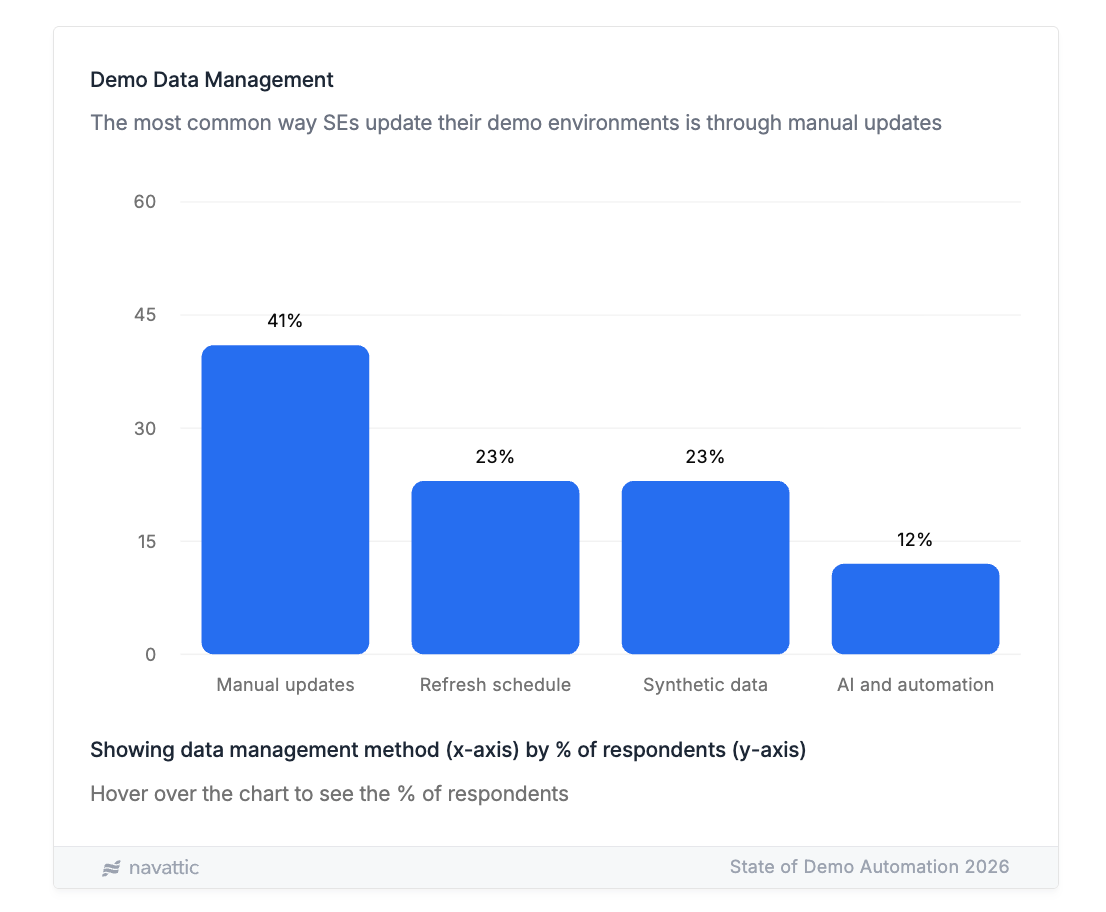
Curious how SEs are leaning on automation? Read our full 2026 State of Demo Automation report.
Where AI-DIY Hits a Wall
While buyers who used AI for demo prep and customization benefited from fast turnarounds, they ultimately bumped up against some limitations. Namely:
Time and Resources
You can build something great today, but in the next week or next month, you’ll need to incorporate new features, UI changes, or branding tweaks.
While AI can help with quick changes, participants noted that in the long run, internal builds and custom demo environments require developer effort and ongoing upkeep.
They acknowledged that vendors can sometimes do this better, faster, and with lower upfront investment. That’s even more true for small teams with limited engineering expertise.
Phrase, a Navattic customer, opted for a prebuilt platform to get product marketing materials up and running quicker – and make them as realistic as possible.
“We were looking to launch an experience quickly that would still look good and perform. We used video in the past but were looking for a more hands-on viewer experience.
We did consider building a tour using screenshots and animations but quickly realized that we were missing the “in-product” feeling that we were looking for, which was a key part of this user experience.”
Scalability
If you’re the one building an AI demo feature, you’re the one maintaining it.
And if you go on vacation or leave the company, someone else will have to figure out how to use and maintain it.
Buying can help companies move from more ad hoc AI demo prep (read: you scrambling when an AE asks you for help) and maintenance to a more repeatable infrastructure.
Off-the-shelf tools can also be easier for non-technical marketers to use, while in-house or design-tool-based workarounds may require specialist skills or training.
Fear of Looking Fake
AI videos can give off an uncanny valley feeling, not exactly the first impression you want to give a prospect.
Teams that participated in our research abandoned AI video specifically because it felt too artificial. Plus, they felt AI videos couldn’t be customized enough.
Beyond video, SEs and PMMs reported that they were not always able to clone and edit test data like they could with an HTML/CSS-based product demo platform, which made demos look more like mockups and less like the real product.
Privacy and Security
Feeding real product data or proprietary code into an outside AI tool makes people nervous.
If security or legal catch wind of shadow IT, your project could get shut down fast.
One of our customers, Spot AI, a modern AI camera system, went with Navattic after realizing a secure, stable in-house build would be too much of a lift. Per the team:
“If we were to have built out these demos on our own, while ensuring security and product stability, it would have taken at least 150 hours of engineering capacity and potentially wasn’t even feasible, technically speaking.”
A Framework for the Build-vs-Buy Decision
Given this data, what should you do? We’ve put together a list of questions to help you figure that out:
Re: Maintenance
Who is updating your demo assets the next time the product changes? How often will that happen?
New features need new steps, rebrands need new visuals, and someone has to be making updates on a regular cadence.
If you have the resources to do it, that’s great, but not everyone does. And if you don’t, an AI-powered demo tool can help you edit a whole lot faster.
One G2 reviewer shares: “I’ve been on Navattic for about 4-5 months and getting a demo built and out the door is faster than anything I’ve used before.
Capturing and editing just makes sense. You don’t have to fight the tool to figure out where things are. I can build, tweak, and ship a demo in one sitting without pinging anyone in engineering/dev.”
Re: Variation
Will you need different cuts per persona, segment, or launch? Or is one version enough?
One demo for one audience, or even a few demos for a few audiences, is fairly manageable.
As soon as you expand into multiple industries, regions, partners, and company sizes, though, a more standardized way to build and store demos can be useful.
A tool with built-in AI capabilities can speed up the process. Another G2 reviewer shares:
“The feature I get the most value from in Navattic is the AI Copilot. It dramatically speeds up demo creation.
Instead of building every tooltip and step manually, it generates a first draft of the demo copy and story structure for me, which I then refine to match our messaging. That alone saves a meaningful amount of time when I’m spinning up demos for different use cases.”
Re: Scale
What does volume look like a year from now?
It’s easy to spin something up that works right now, but what does a repeatable demo motion look like across every future launch, every rep, every segment?
If you’re not sure your self-built solution is going to scale, look for a vendor that’s (1) easy for you to set up on your own and (2) designed to support growth without the need for headcount or favors from engineering.
That’s what nudged Trainual toward Navattic.
“We had considered potentially building an interactive demo experience in-house but realized that was not the right fit.
We shifted directions and began our search for an external solution that was easy to use and quick to set up. We chose Navattic because it was simple to implement, delivered on our requirements, and met our quick turnaround timeline.”
Re: Total Cost of Ownership
When you add up engineering time, ongoing maintenance, hosting (and the opportunity cost of what you could be building instead), does the “free” in-house option still look free?
If you’re on the fence, opt for demo software with a flat, predictable subscription.
Meez, a smart recipe management software built for culinary professionals, ran the numbers and landed on buying instead.
“While some of our potential customers do seek out direct interaction with our sales team, many of them prefer to explore on their own.
We initially considered asking our engineering team to build an interactive demo with pre-populated data that users can explore on their own, but it became an engineering lift we didn’t have the resources to tackle. Navattic came into the picture, offering a much easier solution.”
TL;DR: When to Build vs. Buy
Building wins when: You’re making one-off videos or need help creating demo data for sandbox-style environments.
Buying wins when: Your volume is growing, and you value repeatability, standardization, and shareability across the GTM team.
Ideally, your AI demo software should be a best-of-both-worlds situation:
- Purpose-built AI and MCP to speed up demo creation.
- Customization features that made building in-house tempting in the first place.
See how AI-powered interactive demos compares to building yourself. Try Navattic for free.
Turn demos into deals.
Build interactive product demos that engage buyers and close deals faster.