The Essential Guide to Sales Demo Software

Sales demo software enables teams to prep and build product demos for their prospects. Most often, it lets sales teams create interactive, controlled product experiences without relying on production environments or engineering.
It supports multiple demo formats (live, async, self-serve, sandbox, prototypes) and is increasingly important as buyers expect to try products before talking to sales.
Types of Sales Demo Software at a Glance
Three main categories that exist within sales demo software - Discovery software, demo automation software, and live demo software:
- Discovery software: Helps sellers uncover prospect needs, pain points, and ideal outcomes before or during calls. Discovery Tools: Lucidchart, AssetMule, Gong
- Demo automation: Replicates your product experience in a safe, customizable environment with dummy data and lets you share those demos. Demo Environment Tools: Navattic, Mockaroo, Figma
- Live demo software: Enhances real-time screen shares with engagement features, recording, and follow-up tools. Live Demo Tools: Loom, Demodesk, Livestorm
Sales discovery software
Sales discovery helps sellers uncover prospect needs, pain points, and ideal outcomes, laying the foundation for the rest of the sales cycle.
Common use cases for sales discovery software include:
- Prepping for live demos with structured discovery templates
- Capturing visuals, notes, and insights in real time on calls (and sometimes outside of them)
- Surfacing what matters most to each stakeholder
Here are some examples of popular sales discovery software:
| Tool | Best For | Pricing |
|---|---|---|
| Lucidchart | Visualizing current vs. future state | Free + paid tiers |
| AssetMule | Discovery frameworks & insight tagging | Custom pricing |
| Gong | Discovery call analysis & coaching | Custom pricing |
Lucidchart
In enterprise sales, it can be helpful to have a champion walk through their current state. As they talk, sellers can note major gaps in the prospect’s process that your product can fill.
Translating that to a diagram in Lucidchart can be a powerful way to help your prospects visualize cracks in their approach and see how using your product would enable a better future state.
Pros
- Easy to build visual maps during calls. Users say things like “The best thing about Lucid, in my opinion, is how simple it is to transform an ambiguous concept into an understandable diagram.” (G2 Review) and “Easy to use and collaborate with the team. You can get started in a few minutes, it’s so seamless.” (G2 Review)
- Helps champions articulate gaps. In enterprise sales, it can be helpful to have a champion walk through their current state. As they talk, sellers can note major gaps in the prospect’s process that your product can fill. Lucidchart makes it easy to highlight these gaps during the call and send it to them later as a leave-behind.
Cons
- It’s manual. You have to draw out diagrams yourself, which can be tedious (and may even be better to do offline than on a live call).
- It’s just a visualization tool. It doesn’t really provide much value outside of that (doesn’t connect to a sales pipeline, CRM platform, or any other GTM tech).
Pricing
Lucidchart has a free plan, which comes with 3 editable Lucidchart documents, 60 shapes, 100 templates, basic visual activities, basic data linking, presentation mode, and commenting.
Team plans start at $10 per user per month, and come with a developer platform, revision history with versioning, password-protected publishing, and integrations with tools like Microsoft 365 and Jira.
AssetMule
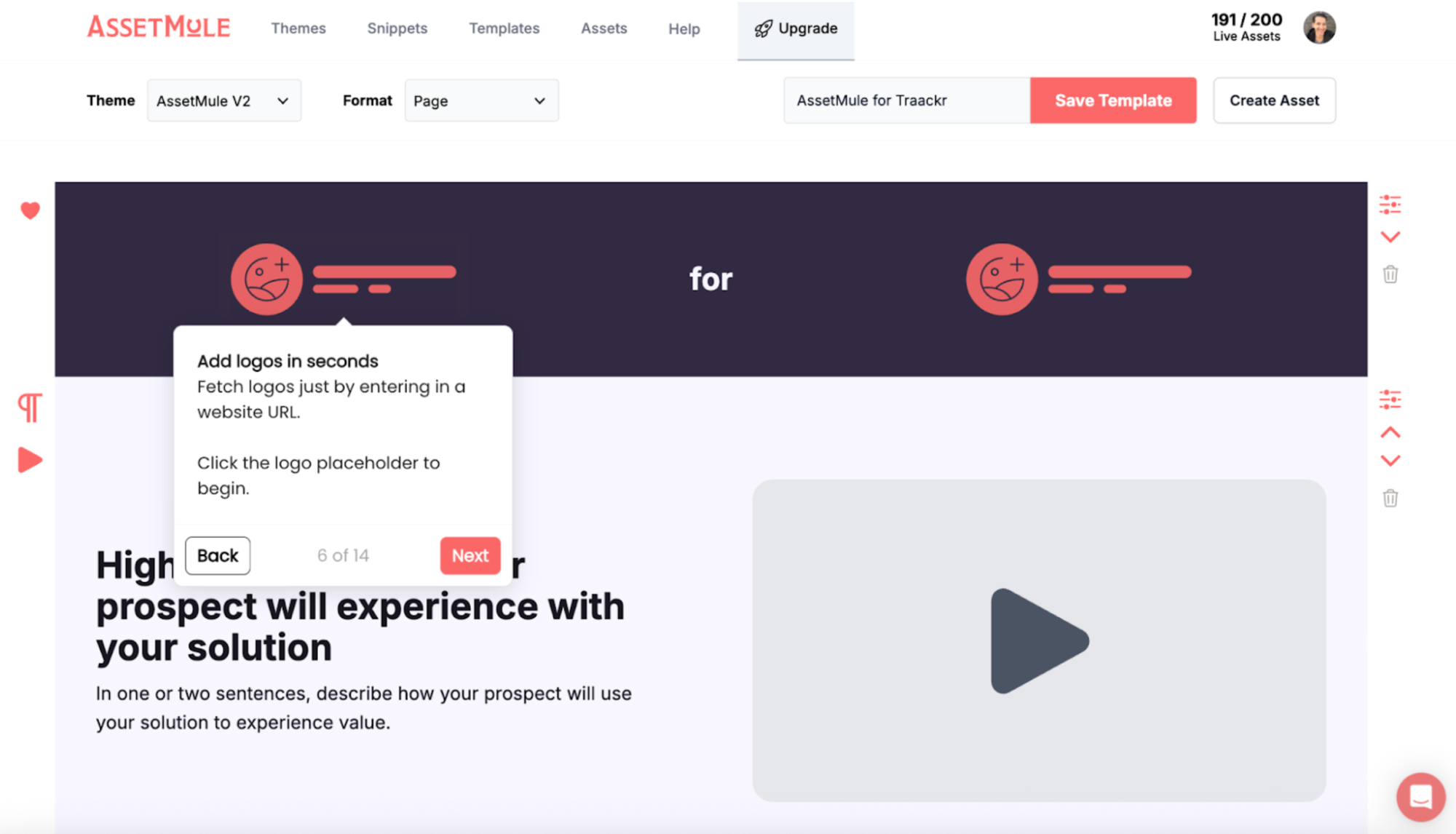
AssetMule lets you build an interactive, trackable library of sales assets for your prospects. That way, they don’t have to sift through emails to find slides or PDFs.
They can go to AssetMule to browse videos, interactive demos, and any other documentation that might be relevant to your discovery call.
Pros
- Lets reps create structured discovery frameworks by adding assets in the order they want users to see them. They can also pull in brand colors, logos, and fonts to make the portal feel more tailored to the account they’re selling to – just by pasting in the company’s URL.
- Sharing power. You can share them with an entire buying committee asynchronously (and see who clicks on or downloads what).
- Auto-tags insights to key personas or value drivers. If certain decision-makers only care about one part of the product, they don’t have to sit through an entire demo or call recording to get the info they need. They can jump straight to the use case that applies to them.
Cons
- It’s a newer tool on the market. It launched in 2023 and only has a handful of G2 reviews.
- Takes time to upload assets. Users say things like, “It requires you to learn the mental model of templates vs assets, but the documentation makes it really quick,” (G2 Review) and “It can take a little bit of time to wrap your head around the concept of a template vs. an asset. But you can see how they're iterating on these concepts quickly and the team is all over any feedback we have for them.” (G2 Review)
Pricing
Assetmule has a free plan that lets you create 3 live assets. You also get access to unlimited templates and users.
The Pro Plan gives you access to way more assets: 50. Plus, you get a custom domain and can remove the “Powered by AssetMule” watermark. If you need more live assets, you can buy 50 for an extra $25 per month.
Gong
Reps can’t possibly remember everything they said in a call, let alone what prospects said. Recording and transcribing discovery demos using tools like Gong can help reps improve their discovery skills over time and uncover insights they didn’t catch during the call.
Gong can also surface lines of questioning that resonate particularly well with buyers or discovery techniques that top performers use.
Pros
- AI-driven call insights. Users say things like “Implementation of AI is also nice and the number of features it has to track calls, interactions, and integration of AI is improving each update,” (G2 Review) and “The AI’s ability to capture, analyze, and surface insights from calls and emails is a game-changer. The Ask Anything tool and customizable Deal Briefs make it easier to keep track of opportunities and identify risk areas.” (G2 Review)
- Surfaces what top sellers ask during discovery, which can help sales leaders teach other reps best practices and onboard new reps quickly.
Cons
- Requires high call volume to deliver strong insights. Without many calls, you’re not going to have great data to work with. For small teams, Gong might be overkill.
- Can be slow. Users say things like “My frequency of usage is every day, and sometimes it is laggy,” (G2 Review) and “Sometimes it does not load for me.” (G2 Review)
Pricing
Custom pricing.
You have to fill out their questionnaire about how many team members you have and how Gong can best help your team (coaching, rep efficiency, GTM analytics, etc.), then wait for a sales rep to reach out with a quote.
Demo automation software
Demo automation is a specific use case within sales demo software that can replace repetitive, live high-level demos with self-serve, async experiences that prospects can explore on their own.
Demos sent in the first 14 days of a deal convert at a 72% win rate versus 59% with no demo touches, per our State of Demo Automation report.
Automated demos replicate what it’s like to use your product, even if the real thing isn’t ready or reliable. A demo environment is great when you need to:
- Show a POC for unreleased or buggy features
- Create a custom environment for a key vertical or account
- Give users a more hands-on experience that doesn’t break
| Tool | Best For | Pricing |
|---|---|---|
| Navattic | Interactive demos with dummy data | ~$500/month |
| Mockaroo | Generating dummy data | Free + paid tiers |
| GenerateData | Exportable fake datasets | Free + paid tiers |
| Figma | Prototyping unlaunched features | Free + paid plans |
Key features to look for in demo automation
- HTML capture support: Allows prospects to interact with realistic product workflows, not just static screenshots or videos
- Personalization capabilities: Variables, visitor inputs, and branching logic to tailor demos to specific use cases
- AI and agentic capabilities - Use AI to help speed up and polish demo building, or create an entirely agent-led demo
- CRM and analytics integrations: Flow visitor data directly into your sales tools and measure demo-to-revenue impact
- Library management: Centralized storage with tags, version tracking, and access controls
- Security controls: Form gates, password protection, and one-on-one links to control demo access
Navattic
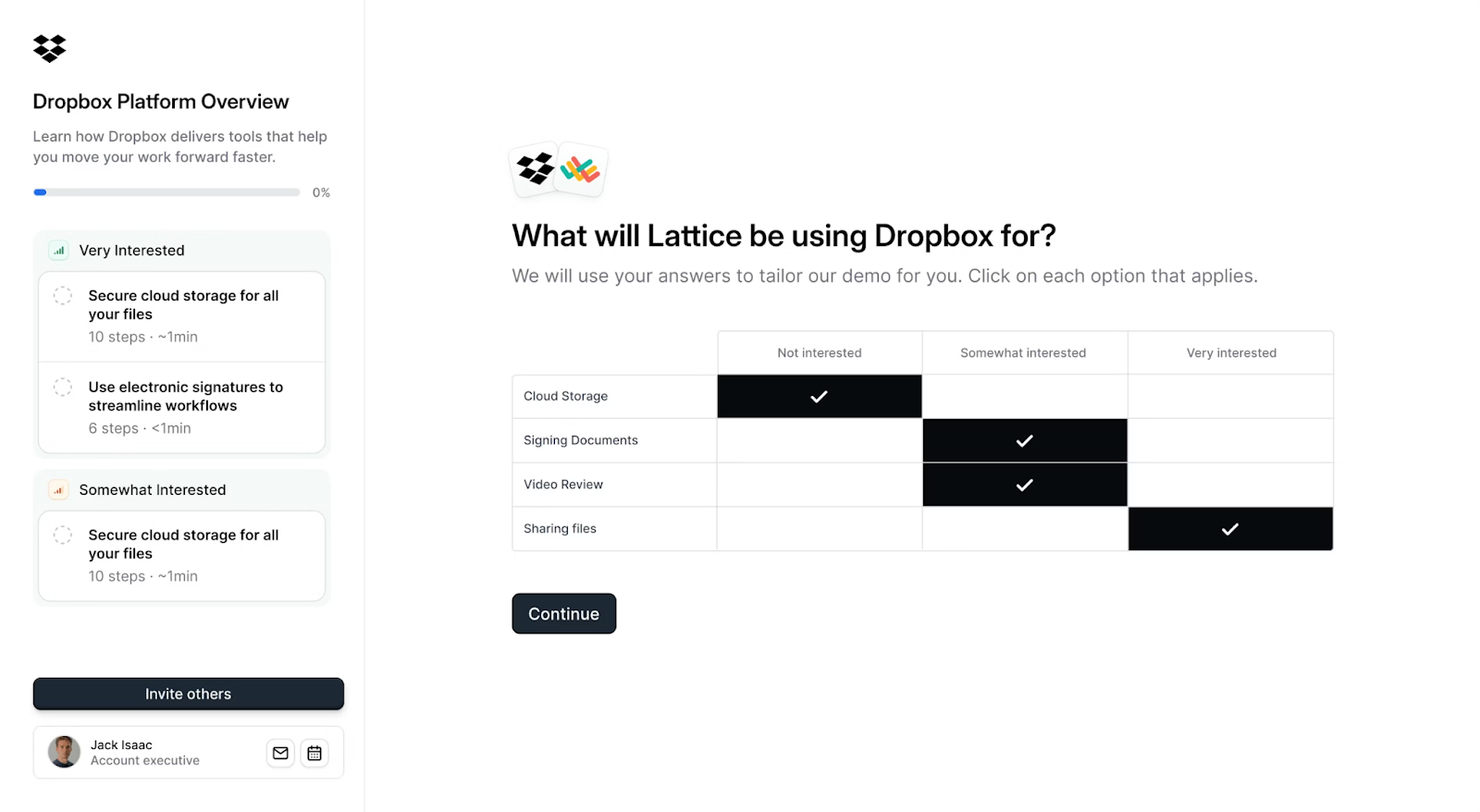
Demo automation software that lets you send early-stage prospects async demos before and after live calls and save presales time on unqualified calls.
With Launchpad, sales engineers can build a library of demos for their sales team. They can mix and match to create demos depending on what the prospect, account, or vertical cares about most and share them straight from Navattic’s Chrome Extension.
With Navattic Agents, demos, website, and qualification agents interact with prospects, answer their questions, and navigate your product in real time to support SMB leads, international prospects, and supplement the sales cycle.
Try an interactive demo of Navattic Launchpad
Pros
- Multi-purpose. Customers can use demos across their entire sales cycle. According to one customer, "I want to mention all the different ways I can use it to support our business, from sales enablement to internal education to conferences and now even POCs. I use it absolutely every day, and my work is essentially Navattic.” (G2 Review)
- Ease of sharing demo from popular sales tools like Gmail, Outlook, Outreach, Gong, Salesloft, LinkedIn, and Salesforce.
- Ease of tracking. With real-time alerts and demo engagement tracking, Navattic makes it easy for sales to prioritize follow-ups and gives all GTM stakeholders full visibility into prospect behavior. According to one customer, “the analytics are super helpful for tracking engagement, and it integrates smoothly with our existing tools”.
Cons
- Live demo options. We can't create a full demo environment replica, but we do have the ability to create high-level “click-anywhere” sandboxes.
- Terminology. Some users report a bit of a learning curve when it comes to interactive demo technology, like flows, captures, modals, and tooltips (G2 Review).
Pricing
Navattic has four pricing plans:
- Starter: $0/month, which comes with 1 seat, 1 demo (HTML or media), unlimited demo views, and basic analytics.
- Base, at $500 per month, gets you 5 seats, unlimited HTML demos, Salesforce, Marketo, and 25+ other integrations, account identification, sandbox demos, A/B testing, and a dedicated CSM.
- Growth, at $1,000 per month, gets you 10 seats, sales integrations (Gong, Salesloft, Outreach, Gmail, Outlook, and more), interest level demos, buyer circle discovery, demo translation, custom domains, and SSO and directory sync.
- Enterprise: Talk to sales, comes with all Growth plan features, plus custom seats, offline demos, HTML capture translation, audit logs, professional services, priority support, and demo consultation.
Mockaroo
Many SaaS platforms run on huge volumes of data. Creating all that test data just to show off one feature can be extremely tedious for solutions engineers.
Instead of doing it by hand, they can use a web-based data generator platform like Mockaroo.
Pros
- You can design your own mock APIs. According to their website, “you control the URLs, responses, and error conditions,” and you can make 200 requests per day.
- Very intuitive dummy data generation with no daily limit on the number of files you download. If you need to, you can also
- You can create a schema from sample data. Paste CSV, JSON, or XML data in, and Mockaroo will use AI to choose the fields for you.
Cons
- Only outputs raw data, which you have to then incorporate into your demo environment.
- Slow to update. The last update was in May 2024.
Pricing
Free for up to 1,000 rows of data.
A Silver Plan ($60 per year) will get you up to 100,000 rows per file, and you can generate 1M records per day via the API at 8x the speed of the free plan.
Generatedata
Generatedata is an alternative synthetic data generator to Mockaroo. It’s an open-source project on GitHub that lets you create data for $25 per year.
Pros
- More format options than Mockaroo, including JSON, CSV, SQL, XML, HTML, JavaScript, Typescript, PHP, Perl, C#, Ruby, and Python.
- There’s a preview function so you can verify that your fake data looks legitimate as you’re building it.
- More types of data. You can generate 30+ types of data, like names, emails, and countries. You can also save your datasets, with no limits on size or number.
Cons
- Offers field types tailored to different countries. Think postal codes, provinces, tax IDs.
- Software can get out of date. Because it’s an open-source project, updates are mostly volunteer and happen sporadically. The last one was in December 2024.
Pricing
$25 per year.
Figma
Sometimes you may want to show a new product that’s not quite ready. In that case, you can create a demo-like environment in Figma.
Prospects can click through various screens to see how your product might look in real life.
Pros
- Easy to build quick prototypes. Users say things like “What I like most is that it's very easy to use. For someone with basic design knowledge, they'll quickly become familiar with it.” (G2 Review) and “The recent AI features in Figma have been very helpful, allowing me to create designs in a much shorter amount of time.” (G2 Review)
- Works well for product marketing. Collaboration features are built in so reps and SEs can comment on mockups from product or product marketing or even reuse some of the mockups they’ve created for sales calls. “I like that I can work with my team on the same file at the same time. It’s simple to use and works on any browser, so I don’t need to install anything.” (G2 Review)
Cons
- Not truly interactive. Clicking through screens is not the same as getting your hands on a product, and it doesn’t give users as much confidence that your product does what you say it does.
- Not data-driven. If you’re looking at a Figma live, you can see where people are spending their time or clicking around, but there’s no backend tracking to reference if you’re not watching them.
Pricing
The Figma Starter Plan is free. It comes with basic design, presentation, and brainstorming tools, UI kits and templates, basic design file inspection, and limited AI credits.
Their other plans vary in price depending on how many users you have and what features they’ll be using. A Full Seat (access to all Figma products) is $16 per month.
Live Sales Demo Software
Live demos continue to play a crucial role in sales calls, and several tools on the market can help sellers get all their points across – and track their effectiveness.
Reps typically use live sales demo software for:
- Enhancing user engagement during screen shares
- Writing post-call summaries and next steps
| Tool | Best For | Pricing |
|---|---|---|
| Loom | Demo recaps + async follow-up | Free + $12/month |
| DemoDesk | Collaborative live demo platform | Custom pricing |
| Livestorm | Live webinar-style demo delivery | Free + paid tiers |
Loom
Live demos can be a lot to take in, so some sellers send a video recap that’s easy for prospects to digest.
Loom is an online video platform reps can use to record themselves summarizing the main points of a demo, answer any outstanding questions, or even capture a quick screenshare to reinforce how a part of the product works.
When they’re done, they can just copy the link and paste it into an email, text, or LinkedIn message.
Pros
- Quick and easy to use. Reps can record video recaps and follow-ups in just a few minutes using Loom’s Chrome extension.
- Shows the full scope of your product. You can show multiple modules or even integrations in action.
Cons
- Not interactive or guided. Unlike sales demo environment software, Loom doesn’t let leads interact with your product. They just have to trust it can do what your rep is saying it can in the video.
- Poor file management. “The load time to upload videos, even for small 30-second ones, has significantly increased lately. I also don’t like the file management, it’s very clunky. Something about the design is too heavy.” (G2 Review)
Pricing
Loom’s Starter Plan is free, letting you record unlimited meetings and up to 25 5-minute-long recap videos. If needed, you can translate transcriptions into 50 languages.
If you are creating longer videos, you’ll need to be on Loom’s Business Plan, which is $15 per creator per month. On it, you get unlimited videos, unlimited recording time, basic waveform editing, and custom branding.
Note: To access any of Loom’s AI features, you must pay for the “Business + AI Plan,” which is $20 per user per month.
Demodesk
Instead of just talking at a prospect for an hour, Demodesk lets you pull them into the conversation.
The platform serves as a live meeting room where you and your prospect can engage collaboratively.
Recently, Demodesk has taken its marketing in a slightly different direction, positioning itself against call recording software like Gong and Fireflies, “automating meeting scheduling, providing real-time coaching during sales demos, automating CRM admin tasks, and delivering actionable meeting insights.”
It will be interesting to see if they continue to push in this direction versus live demo software going forward.
Pros
- AI agents record and analyze your conversations. They provide coaching suggestions, send detailed follow-ups, and automatically update your CRM.
- Sellers can share their screen and write on it directly. (G2 Review)
- GDPR compliant. That said, one user points out: “The bot often enters meetings without notice or audible announcement.”
Cons
- Requires some training and setup. “I think the UX needs some improvement, it's not intuitive to find my way to important settings,” (G2 Review) and “A few more onboarding videos in addition to the detailed FAQs would be desirable.” (G2 Review)
- Some users complain about AI accuracy. “The AI for writing emails could be a bit better when it comes to templates (like ‘write an email with the summary of today's training using the template copied below’),” (G2 Review) and “Sometimes the system doesn't quite recognize certain terms or languages correctly – especially when someone has a strong accent or switches between two languages.” (G2 Review)
Pricing
Demodesk has a 14-day free trial.
After that, their pricing starts at $49 per month. This plan includes an AI sales agent, an AI assistant, an AI coach, an AI analyst, AI summary, follow-up and CRM sync, and integrations with dialers, calendars, and CRMs.
Note: Teams of 30 or more must contact sales for a custom enterprise pricing plan.
Livestorm
Livestorm is a browser-based platform for live, pre-recorded, or on-demand online events.
Livestorm is unique in that, besides streaming a live demo, you can use it to send emails, chat with your audience, create registration pages, launch polls, answer questions, and even track and analyze engagement.
Pros
- All-in-one for live demos, Q&A, and polls. A more interactive live demo can encourage more people to participate and make your sales call more memorable and meaningful. “Very interactive in that viewers can comment and also message privately. The poll and 'ask a question' feature is also very interactive. In terms of planning the webinar and setting up the site, it is also a seamless experience, allowing us to manage it all in one place and integrate with our operations.” (G2 Review)
- Works both for marketing and sales teams. People complain that Livestorm is expensive, but it might be worth the cost if you’re spreading it across multiple GTM teams.
- Positive reviews. At the time of this writing, Livestorm has a 4.4 / 5 rating on G2 with over 1,600 reviews.
Cons
- Not specific to sales. Designed more for webinars than 1:1 sales.
- Could update some features. Users say things like “It can be challenging when I’m presenting, as I have to move back and forth between tabs to engage with comments,” (G2 Review) and “Doesn't offer a robust post-webinar follow-up. No surveys for NPS integrated. Drop-off viewing is also very limited and quickly disappears. Sessions and events are a little difficult to navigate if you only have 1 session.” (G2 Review)
Pricing
Livestorm plans start at $105 per month (billed annually) and scale up based on your yearly active contacts.
On this plan, you get up to 4 hours/session, up to 3,000 live attendees/session, unlimited events, unlimited licenses, and API access. Multiple workspaces, restreaming, and SAML SSO are all optional add-ons.
Turn demos into deals.
Build interactive product demos that engage buyers and close deals faster.