Should I Use Loom to Send Demos to Prospects?

“I’ll send you a Loom,” has become a default way of saying, “Let me show you what I mean.”
It’s a great instinct, but Looms aren’t the only way to show versus tell.
They’re quick to whip up and easy to send, yes. But for a really polished demo, you need to edit your Loom, which requires more tooling.
Looms can also breed some skepticism. For all a prospect knows, you could be recording in a totally different environment than what they’ll see live.
Plus, once you send your link, you’re flying blind. You don’t know what struck them as interesting, unless they leave a comment or reaction.
And you don’t know who they shared it with (hopefully not a competitor).
Below, we cover what Loom gets right for prospect demos, where it falls short, how it compares to alternatives, and why interactive demos (with video built in) close the gap.
What Loom Does Well for Prospect Demos
It’s Easy to Use
Loom is, by far, one of the easiest SaaS tools to use.
Add the Loom Chrome extension, hit record, start walking through your product, click stop when you’re done, and send the link off to a prospect.
You get notifications when someone views, comments, or reacts to your Loom, so you at least know they’ve watched it.
It Saves Time
Besides saving onboarding time (adding Loom to Chrome takes all of a few minutes), Loom saves both parties the trouble of hopping on a call.
Prospects can watch Looms on their own time, maybe even on 2x speed.
AEs and SEs can fit more strategizing sessions and one-on-one time with larger accounts into their schedules instead of “quick 15 minutes” with potentially not-as-qualified leads.
It Has a Personal Touch
Sharing your screen already feels pretty personal.
But Loom also lets you record with your camera on, so prospects see your face, hear your tone, and pick up on your facial expressions and overall enthusiasm for the product.
That helps build trust with the person on the other end ahead of a live demo.
Loom’s Limitations for Prospect Demos
Demo videos, like the ones you can record with Loom, are a fine option for a simple walkthrough. But they come with downsides:
Potential Lack of Engagement Data
If you have the Loom Business, Business + AI, or Enterprise plan, you can see:
- Who has watched your video
- How much of your video they watched
- The percentage of viewers who selected your call-to-action
But, and this is a big but, it has to be a tracked session, meaning the viewer themselves has to be logged into Loom.
Unless they’re a frequent user of Loom themselves, that’s not going to be the case very often.
If you really want engagement data, you can:
- Require prospects to share their email address – an annoying extra step.
- Ask for their email. However, they can X out of that pop-up (in which case, you don’t get their engagement data).
Without knowing which parts of the video (i.e., which features) gave them an “aha moment” and which parts were ignored or fast-forwarded through, your reps and SEs will have a hard time tailoring their live demos.
Restricted Access Controls
Loom has a workspace-only viewing setting for all of its plans.
But this is designed to keep internal content secure, not to manage who sees a specific prospect demo.
Email domain restriction and link expiration can help limit access to your Looms, but they’re only available on the more expensive Enterprise and Business + AI plans.
Missing Repeatability
Even if you’re basically recording the same exact walkthrough for a different prospect, you’re going to have to start over.
You’ll want to personalize your intro, put a little spin on a use case that’s super relevant to their industry or role, and maybe upload some data to your demo environment that looks like theirs.
None of that carries over from one Loom to the next.
Not to mention, your product is constantly changing. If you have a long sales cycle, the Loom you sent a month ago might show outdated UI, making prospects wonder what else has changed when you show them the product live.
Inability to Scale
If you’re trying to send polished, personalized demos at scale, Loom just isn’t going to cut it.
It’s why more and more SEs are replacing videos with interactive demos, a way to control the environment, reuse content, and make edits with AI.
As the team at Crossbeam puts it: “Recording a video could easily take twice as long and end up not nearly as polished as a Navattic demo.”
Plus, demos give prospects a hands-on experience, which gets them more curious and engaged – and you can measure that interest on the backend.
The team at Insider One, a cross-channel experience platform, saw a 3x increase in time spent on interactive demos when compared to their traditional video content.
“Our interactive demos are providing an engaging user experience that can not be replicated with static video or image-based content.”
Alternative Tools for Sending Demos to Prospects
If you’re rethinking your use of Loom at this point, you’ve got options. Here’s the lay of the land.
If you want video-only:
Vidyard
What it is: A sales video platform.
It’s got better tracking than Loom and works with HubSpot.
Per one G2 reviewer, “Vidyard being integrated with HubSpot is really helpful because I can easily share videos through different platforms like Gmail and HubSpot without linking. I can also track emails and deals people are clicking on, which is really beneficial.”
Vidyard lets you customize AI avatars for a specific voice and tone.
That being said, the platform is still video only, which means it doesn’t give the clickable, exploratory experience a prospect would get from an interactive demo.
Consensus
What it is: Consensus automates personalized videos.
It works well for more standardized use cases where every prospect needs roughly the same walkthrough.
“Consensus helps me get video demos out to prospects and allows me to provide information in a more ‘human to human’ way by recording videos. It helps speed up the sales cycle and helps open doors to new contacts you may not have had access to.” (G2 Review)
Note: You can layer on click-through flows and conversation agents, but their platform is mostly video-based.
If you want interactive tools:
Reprise
What it is: A platform that lets users build three kinds of demos: guided walk-throughs, live overlays, and cloned sandbox environments, and store them all in one centralized location.
These interactive elements let prospects explore even the more complex parts of your product on their own.
“It allows me to communicate via storytelling very difficult and complex environments and use cases. The ability to then take all of these tours and use them to tell my stories with ‘one voice’ has been vital to internal communications and sales support.” (G2 Review)
Reviewers note that setup is complex, saying things like:
- “It is a comprehensive product with growing configurability. So the trade-off is, to utilize all of its features, all of its capabilities, it takes time to learn. There are some rather more technical pieces to it as well that require more specialized knowledge.”(G2 Review)
- “The demo experience itself can still use some refinement to make it more app-like. Some features, such as hiding certain elements or working with modals, require custom code, which means engineering time with Reprise.” (G2 Review)
Walnut
What it is: Walnut offers both interactive demos and personalized digital sales rooms where you can share content (case studies, use cases, demos, videos) and track buyer engagement across the deal cycle.
Mixing content types lets prospects learn about your product’s value props the way they want to, and gives you a more detailed picture of what content they like and engage with.
Compared to Loom, Walnut content is also much easier to reuse and edit.
One user says, “I can set up the demo differently for all my prospects and not have to remake the whole thing. That helps me save a lot of time. I can modify the text and switch out some data to make the demo look customized.”
Then again, having all that content is a double-edged sword:
“Walnut is very difficult to use because there are no folders, and all information is dumped into one large pile. I dislike when the slides distort, and then I have to re-upload them three times to get the font to display normally.”
Navattic
What it is: Navattic is demo software that enables teams to capture their product once and turn it into reusable interactive demos and sandbox demos.
You can also drop in a short welcome video at the start of a demo, so you keep the personal, face-to-camera touch of a Loom without giving up the interactive experience.
SEs can use Navattic’s Launchpad to understand prospects’ interests before a live call, surface stakeholder activity, and reduce repetitive demos.
They can even add a per-share recipient form gate (name or email), send a unique access code to a prospect’s inbox, and set expiration dates at the individual demo level.
“It's a very intuitive system that takes us 15 minutes on average to create custom walkthrough content,” says one G2 user. “With past tools I’ve used, it would take hours to build out demos. This saves our SEs so much time.”
Terminology takes some getting used to, but once you’ve got your first one under your belt, the next ones come together fast (especially because you’re not starting from zero).
How to Use Navattic Launchpad to Send Interactive and Video Demos
With Navattic, you can keep the personal feel of video while also giving prospects a chance to experience your product on their own.
Launchpad makes it easy to customize pre-built demos with name, role, and company variables and mock data, too.
So easy that for many of our customers, including PowerSchool, sending an interactive demo has become the team’s first instinct: “Over 90% of our deals are using Navattic interactive demos throughout the sales process.”
Here are our favorite ways to use Launchpad in your demo process.
Record a Personal Intro Video
To catch people’s attention (and encourage them to enter the demo), reps can record a custom welcome video.
All they have to do is:
- Head to the Demo Library in Launchpad.
- Click + Add, then select Custom Video.
- Upload or record video content.
- Assign an Interest category and add Tags to organize your video.
- Publish to make it available.
Erik Long, Sales and GTM Lead at Navattic, records a more personalized video for more strategic, high-value accounts:
“Something along the lines of ‘Hey so and so, super excited that you’re interested in Navattic, would like to show you a few more things I think will suit your use case.’”
That extra 30 seconds makes them feel like you’re listening and taking their requirements to heart.
Combine Videos and Flows
If you’re working with a prospect that has a more complicated set of use cases, it might make sense to sprinkle videos in with your demos.
That way, it feels like more of a guided experience. And in many cases, that gives you an edge over your competitors.
The team at GovDash, a platform that streamlines the government contracting lifecycle, emphasizes, “No one else in our market is using interactive tours.”
For them, Navattic is a way to get people excited about their product and communicate the value of their feature-rich platform in a digestible way.
“Demos cultivate interest faster, and provide an edge against our competitors by giving potential customers an experience of the product before they even get on a call with someone.”
We also recommend using Interest Demos to help users self-select what they care most about.
You might segment them by feature or product areas, like payroll vs. corporate spending vs. credit cards.
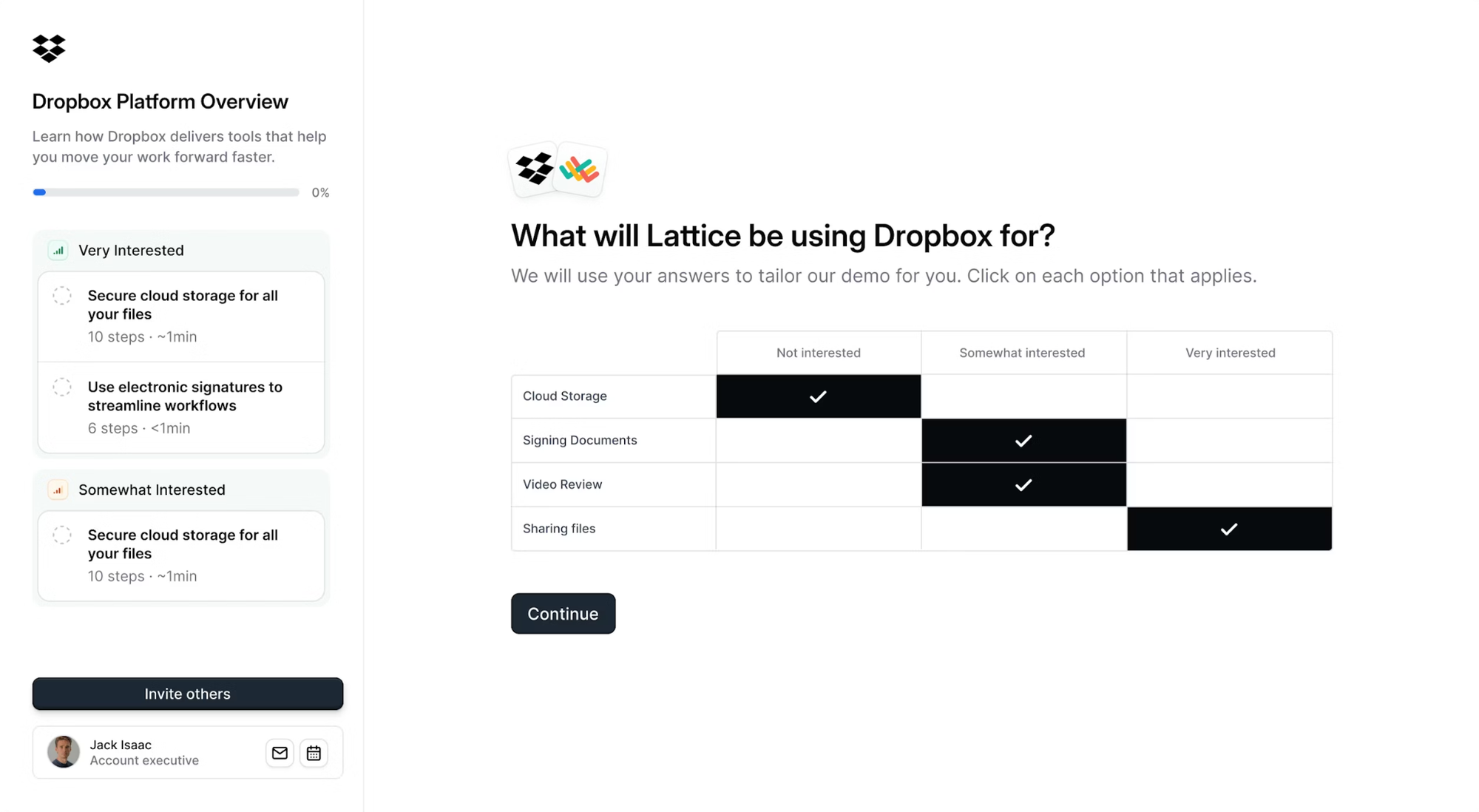
Add at least 5 steps (up to 15) for each one so you can see how far people get and what they might need more clarity on in a live call.
Use Analytics to Prep for Your Next Call
In Launchpad, you can analyze every demo:
- Who viewed it (via form gate or access code)
- How far they got
- Which steps drove clicks
- Who they shared your demo with
You can even skip the dashboard and send that context straight to your reps and SEs via email or Slack alerts.
They can follow up right away to get a call on the books. During that call, they can concentrate on the features their prospect cares most about, turning what could’ve been a long, drawn-out discovery into a focused conversation.
Test out interactive demos for a change. Build your first one for free.
Turn demos into deals.
Build interactive product demos that engage buyers and close deals faster.