Sandboxes vs. Interactive Demos vs. Demo Automation Tools: What’s the Difference?

The way people purchase software has changed a lot over the past decade. Today, buyers want to do more research on their own – and get their hands on your product – before they ever talk to sales.
More and more demo tools have cropped up to meet those expectations. And for GTM teams, that’s both great and confusing.
With so many platforms on the market, it’s hard to keep track of what each does and how they stack up against each other.
So, we’re making it easy on you.
Below, we explain how sandboxes, sandbox demos, interactive demos, and demo automation tools differ, when to use them, and the kind of ROI you can anticipate from each.
Before we go into detail, let’s start with some definitions:
- Sandboxes are cloned product environments. SEs and reps use them during live demos or share them with prospects as a proof of concept.
- Sandbox demos are not your actual product, just a recreation of it, making them ideal for use during live sales calls (no potential for bugs or errors).
- Interactive demos are click-through, asynchronous experiences that you can send before or after live demo calls.
- Demo automation tools let you capture your product once and then turn it into an interactive product demo or a sandbox demo environment.
How Traditional Sandboxes Work
As we mentioned above, traditional sandboxes are a complete replication of your product. That’s ideal for technical buyers who need to:
- Interact with real data (or even their own loaded in)
- See how integrations perform in real time
- Evaluate whether your product meets compliance, scalability, and custom configuration needs
But for most buyers, that level of detail isn’t always necessary. Plus, sandboxes:
- Take time (and support) to set up. GTM teams usually need engineering to provision environments, seed data, manage permissions, and keep everything in sync with production.
- Aren’t easy to share. Most require at least some configuration and guidance for users to see the value of your product, making them hard to share broadly or use earlier in the buying journey.
- Inherit product bugs. They’re a full copy of your product. So if there are underlying bugs in your product, there are underlying bugs in your sandbox – and prospects might stumble upon them during their testing.
Sandbox Demos: Bridging Control and Experience
Sandbox demos are like traditional sandboxes, but they aren’t really a carbon copy of your product.
SEs/SCs build sandbox demos by clicking through their product and using a tool like Navattic to automatically stitch screens together.
When they show a sandbox demo on a call, it may seem like they’re exploring the product. But in reality, they’re navigating a simulated environment preconfigured to highlight the most relevant workflows and data for each prospect.
Compared to traditional sandboxes, sandbox demos are:
- Lower risk. Because they’re just a simulation, sellers and SEs can demo a product “live” without worrying about exposing bugs or messy data.
- Faster to spin up. Sellers and SEs can duplicate a polished demo environment and tailor it to each prospect – without bugging the engineering team.
- Reliable in virtually any setting. They work, whether or not you have good wifi, you’re demoing a brand-new feature, or need to walk through a more complex workflow or integration.
Interactive Demos: Personalization at Scale
Interactive demos are self-guided experiences that help you get your product in front of buyers early in the sales process.
They’re designed for async use – on your website, in outbound campaigns, or as follow-ups to live calls – yet can still be personalized to each viewer.
One way is to ask people about their role or use case upfront. On the Navattic homepage, for instance, we ask visitors to share their role in our demo:
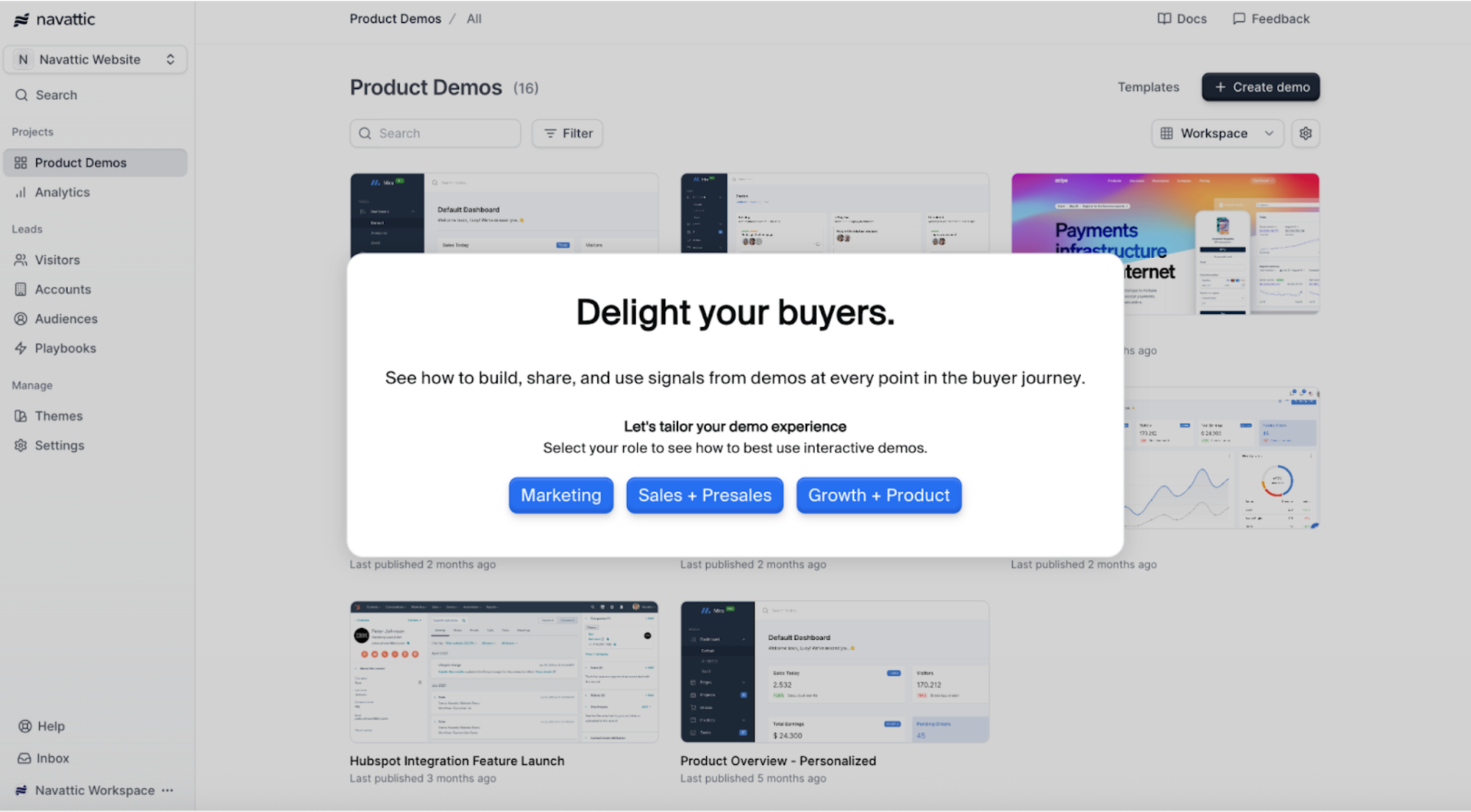
People who choose “Marketing” will see a walkthrough focused on launching a new dashboard, whereas eople who choose “Sales + Presales” will see how to store and share demos with our Launchpad product.
You could also gather visitor information using a Navattic Form and use that to tailor people’s demo experience.
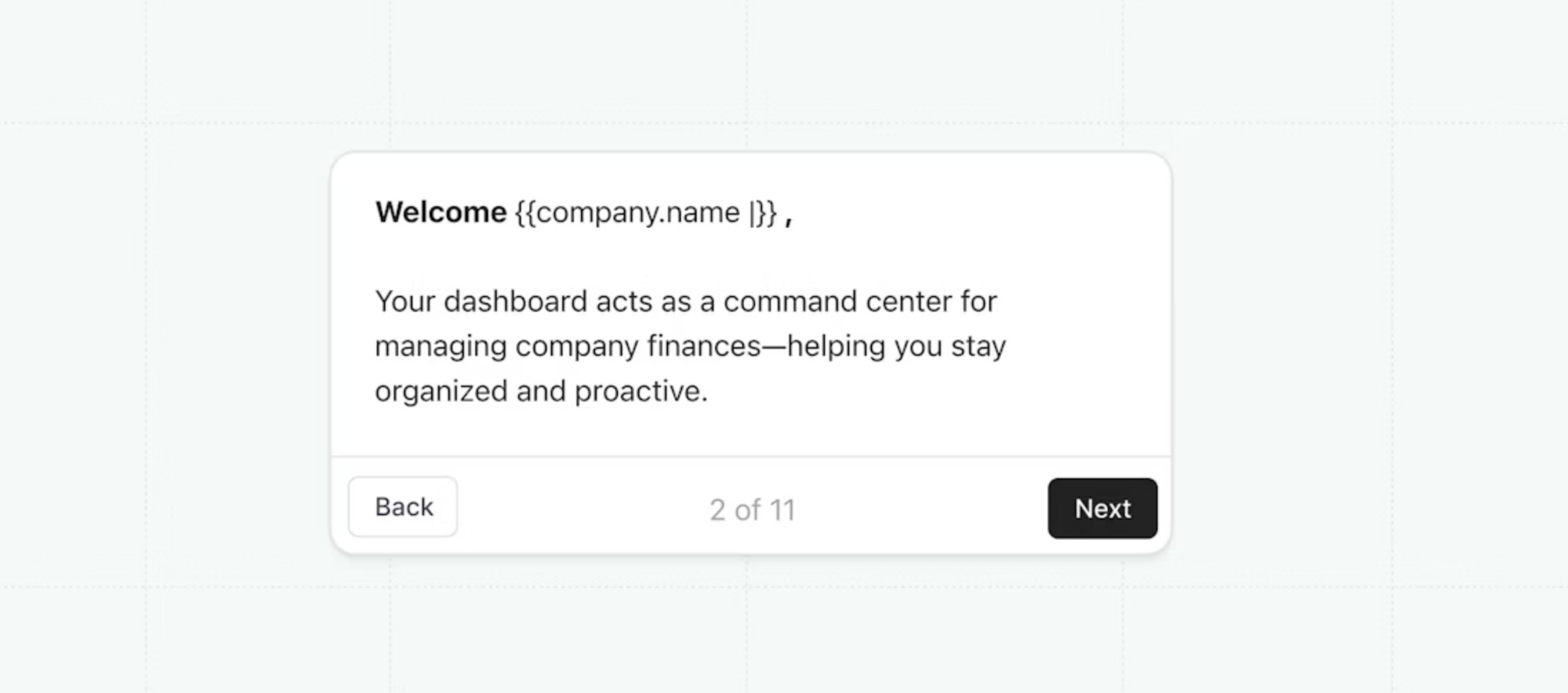
Or, you could add variables from your marketing platform to the end of your demo URL to personalize at scale.
Besides personalization at scale, interactive demos help your team qualify, prioritize, and follow up with leads.
For example, if a prospect completes an interactive demo, that’s probably a sign they’re worth a sales conversation. Reps can also track what Flows each user explored and how many steps they completed to identify the features that stood out (and tailor their follow-ups accordingly).
In Navattic, you can even track buying group activity and send alerts to your reps when multiple visitors from the same company engage.
Compared to traditional sandboxes or sandbox demos, interactive demos are:
- Easier to scale. You can build them once and reuse them across channels, while still giving each prospect a personalized experience.
- Insight-driven. Every click, step, and drop-off point gets tracked, giving GTM teams accurate signals about buyer interest and intent.
Demo Automation Tools Explained
Demo automation tools help GTM teams create, personalize, and scale demos without technical support.
For example, customers use our Launchpad demo automation software to send early-stage prospects async demos before and after live calls and save presales time on unqualified calls.
SEs can capture parts of your product once and create a library of demos that your sales team can mix and match as a click-through experience (like an interactive demo) or live-feel sandbox demo, no code required.
Demo automation platforms are especially useful when presales and sales teams need to build custom, modular demos for specific prospects.
They help teams understand your prospects' interests, uncover new members of the buying circle, and create tailored buyer experiences.
Demo automation platforms combine the benefits of sandbox and interactive demos and unify them into a single system, so teams can manage, update, and reuse demos without extra overhead.
Key Differences Between Traditional Sandboxes, Sandbox Demos, and Interactive Demo Automation Tools (and When to Use Each)
Not every prospect needs a sandbox, and not every demo needs to be built from scratch.
Here's a breakdown of how traditional sandboxes, sandbox demos, interactive demos, and demo automation tools compare and when to use them.
| Demo Type | Definition | Primary Use Case | Technical Lift | Best For |
|---|---|---|---|---|
| Traditional Sandboxes | Full or cloned product environments used for safe testing or live demonstrations. | Sales engineering, complex feature testing. | High – requires engineering setup and maintenance. | Technical teams, later-stage validation. |
| Sandbox Demos | Guided, preconfigured demo environments replicating product features. | Live sales calls needing consistency and control. | Moderate – preset flows reduce maintenance. | Sales reps, presales teams. |
| Interactive Demos | Self-guided, asynchronous click-through product experiences. | TOFU/MOFU marketing, lead gen, qualification. | Low – no-code setup, reusable. | Marketing teams, PLG motions, early-stage engagement. |
| Demo Automation Tools | Platforms to build, personalize, and track demos at scale. Helps create both sandbox and interactive demos, and enables 1:1 personalized demos within the sales cycle. | Automating demo flows, lead scoring, and engagement tracking. | Low – designed for non-technical users. | Cross-functional GTM teams, scaling demo programs. |
When Traditional Sandboxes Make Sense
Technical lift: High. You’ll need help from your engineering team to set up a sandbox environment and maintain it.
Best for: Technical teams
Buying stage: Evaluation and decision
Use case: Given their complexity, traditional sandboxes are best suited for late-stage sales cycles when buyers need deep validation and a POC.
Impact: Technical buyers get the depth they need to de-risk (and get buy-in for) a major purchase.
When Sandbox Demos Make Sense
Technical lift: Moderate. It’ll take time to build a baseline sandbox demo and customize for each prospect.
Best for: Presales teams and sales reps
Buying stage: Discovery
Use case: A sandbox demo may not show your entire product like a traditional sandbox. But it shines when the stakes are high, and the margin for error is low, like:
- During your first in-depth video call with a prospect and/or important stakeholders
- At your conference booth
- At in-person meetings
- When you’re showing a multi-product use case
Impact: SEs and sellers minimize the chances of bugs or errors popping up during live demos – while still delivering a realistic product experience.
When Interactive Demos Make Sense
Technical lift: Low. The best interactive demo tools are no-code. And once you create one interactive demo, you can clone and modify it to speed up demo builds.
Best for: Marketing teams
Buying stage: Awareness
Use case: Whenever you want to let buyers experience your product without sales interaction. Interactive demos make sense to have:
- On your website, to increase live demo requests
- As a follow-up to a first sales call, to let users explore a certain part of your product or use case in more depth
- In outbound emails, personalized to vertical or role to boost engagement
- In marketing campaigns or on landing pages to drive product awareness
Impact: Early hands-on engagement shortens pipeline times and reduces reliance on live demos.
When Demo Automation Makes Sense
Technical lift: Low. These platforms are designed specifically for non-technical users and are no-code tools.
Best for: Cross-functional GTM teams who want to scale their demo programs.
Buying stage: Awareness, discovery, upsell
Use case: When you’re running high demo volume and need to personalize at scale without slowing down your team. Use demo automation to:
- Replace low value intro calls with self-guided discovery demos
- Send tailored follow-ups after live calls
- Equip AEs with reusable, sandbox demos
- Add product experiences to G2, TrustRadius, or ABM landing pages
- Train internal teams and external partners faster
- Share leave-behind demos with champions to support internal buy-in
Impact: Scalable personalization speeds up deal cycles, reduces manual demo prep, and keeps your team focused on high-intent buyers.
Implementation Considerations
To get the most out of each demo format, you have to take into account what it takes to build and maintain them.
We’ve already touched on the technical setup, but that’s only one piece of the puzzle. To create great demos, you’ll also need to:
Involve Other Teams
Even with low-code or no-code tools, demo creation isn’t a solo job.
If SEs are refreshing a sandbox demo based on the latest update, they may want product to take a look and confirm they’ve highlighted everything they should.
If sales reps are creating interactive demos, they’ll want SE input, and potentially even marketing input to confirm the copy is compelling and clear enough.
If marketing teams are creating demos, they’ll want product and SEs to weigh in – and maybe even reps, too, since they are the ones talking to prospects day in and day out.
Knowing that demos are a collaborative effort going in helps you leave ample time for feedback before and after you create your demos.
Keep Your Demos Organized
As more and more people use your demo platforms, you’re going to need a structured way to store them.
Otherwise, it’ll get harder and harder for GTM team members to know which demos to share with which audience.
A few best practices include:
- Setting clear access and ownership. When new teams join your demo workspace, assign managers (who control settings and members) and members (who access shared content). Clear permissions prevent accidental changes and give each team control over their demos.
- Standardizing naming and tagging. Consistent tags make it easy to filter by audience, use case, product line, or stage. Labels like “SMB,” “Enterprise,” or “Proposal” go a long way in keeping your demo library navigable as it grows.
- Applying demo defaults. In Navattic, for instance, you can automatically set themes, logos, supported languages, and indexing preferences so every new demo is on-brand from the start.
Want more tips? Read How to Organize Demos in Your Navattic Workspace.
Use AI to Speed Up Your Workflow
AI can dramatically cut down the time it takes to build and edit demos.
It also ensures that all your demos follow your messaging and style guide, no matter who creates them.
Look for demo platforms with AI features like:
- AI writing assistants that can write copy based on each screen capture. It won’t be perfect, but it’ll at least give you a solid foundation to start editing from.
- Bulk update features for charts and graphs. Hyperrealistic data can help prospects feel like your demos were built just for them and their use cases.
- Navattic’s Copilot, an AI assistant that works behind the scenes as you take Captures to write demo copy, anchor tooltips, and craft a cohesive demo story. It will also pull your brand colors, typography, button styles, and other design tokens to generate a consistent demo theme.
- Voiceovers and translations. Voice narration offers a nice personal touch, and enabling any user to understand your demo makes it that much more accessible and shareable.
For a comparison of the top platforms, check out our list of the best demo automation tools, and for demo automation best practices, read the State of Demo Automation report.
Turn demos into deals.
Build interactive product demos that engage buyers and close deals faster.