How to Use Interactive Demos for Help Centers, Onboarding, and Training

According to our 2025 State of the Interactive Product Demo report, the third most popular use case for interactive demos was embedding them in help centers. And using them for onboarding and training was a close runner-up.
Instead of heavy text-based help centers or onboarding docs, interactive demos let users walk through the setup themselves, getting them up to speed quickly and boosting overall adoption.
Now, with Navattic Agents, click-through demos can be more engaging.
Rather than following a prescriptive path, customers and employees can ask the Agent anything they want about your product in their own words.
Below, we show how Navattic Agents can fit alongside a traditional demo for a more conversational education experience.
How Interactive Demos Can Improve Training
Interactive demos primarily educate prospects and customers on specific product features, integrations, and the potential value they bring to users’ day-to-day.
But end users aren’t the only people who need to learn how your product works — employees need to know the ins and outs, too.
Leveraging interactive demos for documentation and training can help new employees become proficient faster and coach existing customer success and sales teams on new features before release.
For Customer Training: Reduce Need For One-on-One Training
Customers want to learn on their own time, and CSMs don’t have the bandwidth to respond to every question live.
There are two ways to give customers instant answers without taking valuable time away from your support team:
1. Click-through demos
An interactive demo walks customers through a feature step by step, using beacons and tooltips to direct their attention to specific parts of the product and explain how they work.
Many Navattic users set up multiple of these demos, one for every workflow that customers normally set up.
Spot.ai, for example, has onboarded over 100 customers via product tours.
Their team shares, “We present interactive demos alongside videos to provide additional options for content. These self-serve training options have significantly reduced the need for our success reps to train individual users on the platform on calls.”
Before leveraging Navattic, Spot.ai’s success team hosted a training call with every user. Converting to a self-serve model with interactive demos has “freed up hundreds of support hours for the success team.”
SourceDay, another Navattic customer, has seen similar results. Their onboarding and training team explains, “After deploying Navattic product tours for user enablement, we saw a 90% decrease in the number of one-on-one trainings needed to activate new users.”
2. Navattic Agents
An interactive demo can show your average use case, but it can’t anticipate or answer follow-up questions that come up.
Which is why we built the Enablement Agent, which helps onboard new customers or reps with self-serve product and training content.
Customers like JR Tippo at Ridgeline have seen firsthand how it cuts down on repeat live calls.
“We’ve had plenty of customer engagements where people go, ‘Oh, now we've got someone new on the team who wants to see it. Can you show the product again?’ Having other resources to satisfy those requirements is huge.”
Note: Interactive demos and Navattic Agents aren’t limited to customer enablement. They can support internal education, conference coverage, and even POCs. Per one digital demo lead, “I use it every single day, and at this point my work essentially runs on Navattic.”
For Internal Training: Increase Employee Understanding of New Products or Processes
As we hinted earlier, interactive demos are an excellent way to show employees how your product works. Besides the self-serve benefit, interactive demos ensure everyone has a consistent learning experience. And they also help reinforce company messaging.
Navattic’s customer, Form, says, “We’ve used product tours for a variety of training use cases for internal teams around new processes in addition to external tours for large trials or new feature adoption.”
Tours are particularly helpful for companies that have to train their employees on a lot of different products. Take Exterro.
With 26 different products, Nicole Mott, their Director of Sales Enablement, knew she needed a way to get folks up to speed without slowing down the sales cycle.
She did it by prepping:
- Vision Demos, which focused on value and ROI for website placement and BDR outreach.
- Microdemos, designed specifically for BDR outreach emails and nurture flows, and to bridge the gap between initial interest and sales conversations.
- Discovery Demos that account executives could use during live conversations.
Putting in that upfront work paid off – she cut down the time it took for reps to host a disco call on their own from 18 months to 5.7 months.
Even if you plan to do in-person training, you can still send interactive demos as a follow-up to live sessions, giving employees hands-on practice material.
Jen Andretta and her team at Simfoni built an always-on library of roughly 30 interactive demos, complete with specialty product showcases to differentiate against competitors so reps could learn more whenever they had the time.
“It enabled every single account executive to get access to it,” she noted.
Some Navattic users have gone so far as to use Navattic Agents as product knowledge “gyms,” so that new AEs can ask “dumb” questions without judgment and see how the product works.
They can even run through what-if scenarios anticipating a customer’s questions to feel extra prepared for a live call.
3 Options for Training
To jumpstart your use of interactive demos for training, we’ve put together some ideas based on how one-on-one you want your training to be.
Way #1 - Add interactive demos to your help center or LMS
Try embedding your demos within an existing help center or academy.
You can design it so that they open up in the same window, or you can link and take users through the demo in another tab.
FYI, If you go this route, we recommend creating how-to demos for high-value features over short walkthroughs of every single use case.
Concentrating on unique, high-ticket features will save you time and allow you to dive deeper into what those features bring to the table.
Example: Bloomreach
Vanessa Sedo at Bloomreach built interactive demos into her company’s docs as ungated “how-to”-type tours so anyone, even prospects, could access them.
That (1) educated leads ahead of a call with sales, and (2) gave the GTM team valuable intel into what people were most interested in.
She also added interactive demos to the company’s existing customer academy to reinforce learning in on-demand courses, finding “step-by-step product navigation is more effective than traditional videos.”
Way #2 - Build checklist or interest demos with multiple features
Checklist demos keep users on track by splitting longer demos (15+ steps) into concrete step-by-step lists.
While users or employees can run through checklist demos in chronological order, they also have the freedom to jump to different steps based on the features they want to explore.
Because users have the checklist to orient them, these demos can be longer than your average help center demo, highlighting multiple use cases (and their setup) rather than one specific feature.
Interest demos can be useful, too.
Giving customers (or internal folks) the autonomy to choose what features or use cases to explore increases engagement.
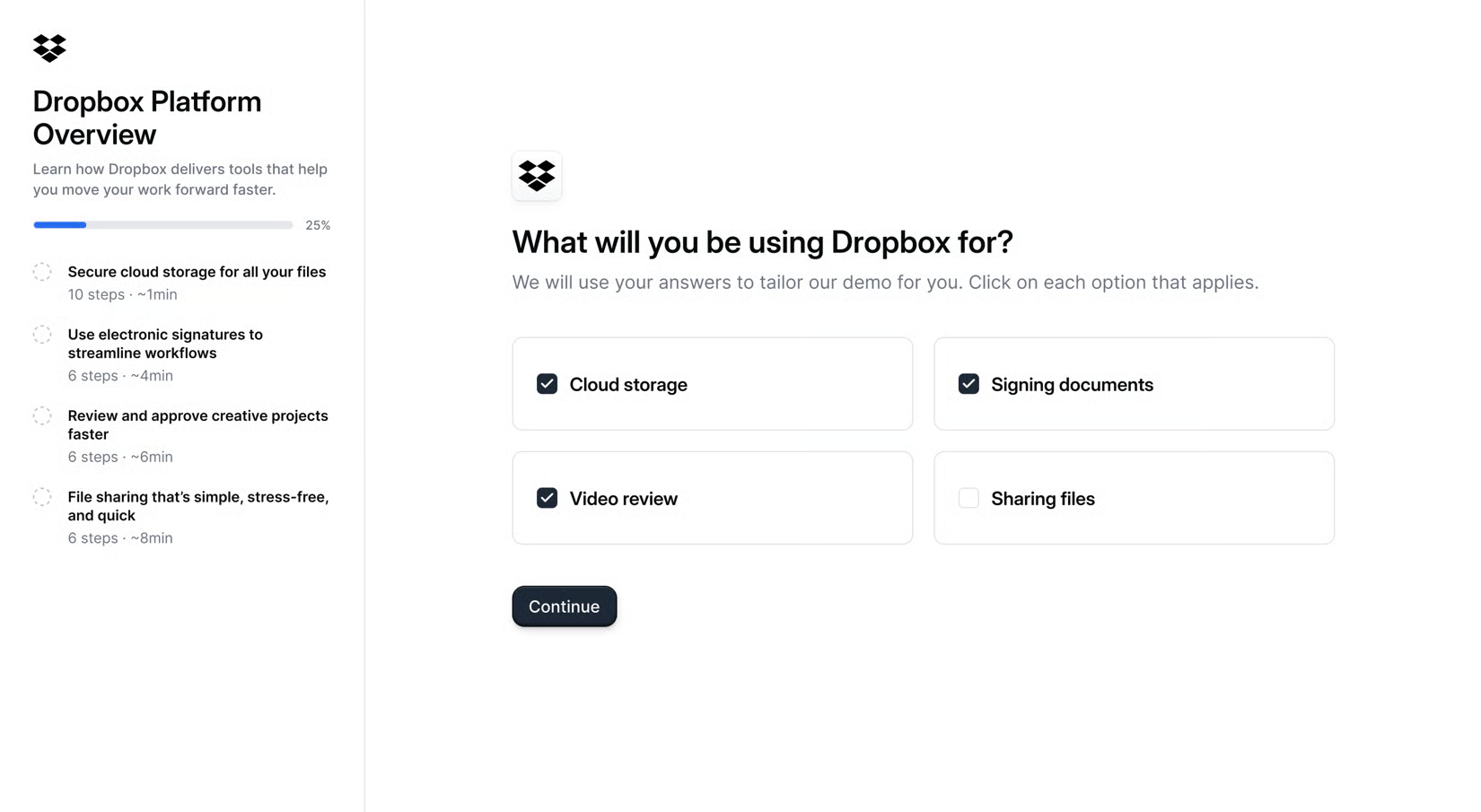
Even better, CS and enablement teams can see what people care most about or maybe didn’t fully pick up on from a live call and can adjust accordingly.
Way #3: Deploy a training agent
If a static demo can simplify internal training, an agent that can field follow-up questions goes a step further.
Navattic’s Enablement Agent lets new customers or employees ask questions and see how the product works in real time rather than clicking through a scripted flow.
This is an ideal option for products with many edge cases, teams of mixed skill levels, or frequent “Wait, what about X?” questions that a fixed demo can’t cover.
3 Top Customer Onboarding Examples
Now that you have some ideas in mind, here are three examples to help you bring them to life.
JumpCloud
JumpCloud, a cloud-based directory platform for identity management, has a robust university with courses that guide users through common use cases and prepare them for official JumpCloud certification exams.
For some of these topics, the JumpCloud team uses interactive demos to show users how to implement more advanced features and integrations. The Windows MFA process is just one example.
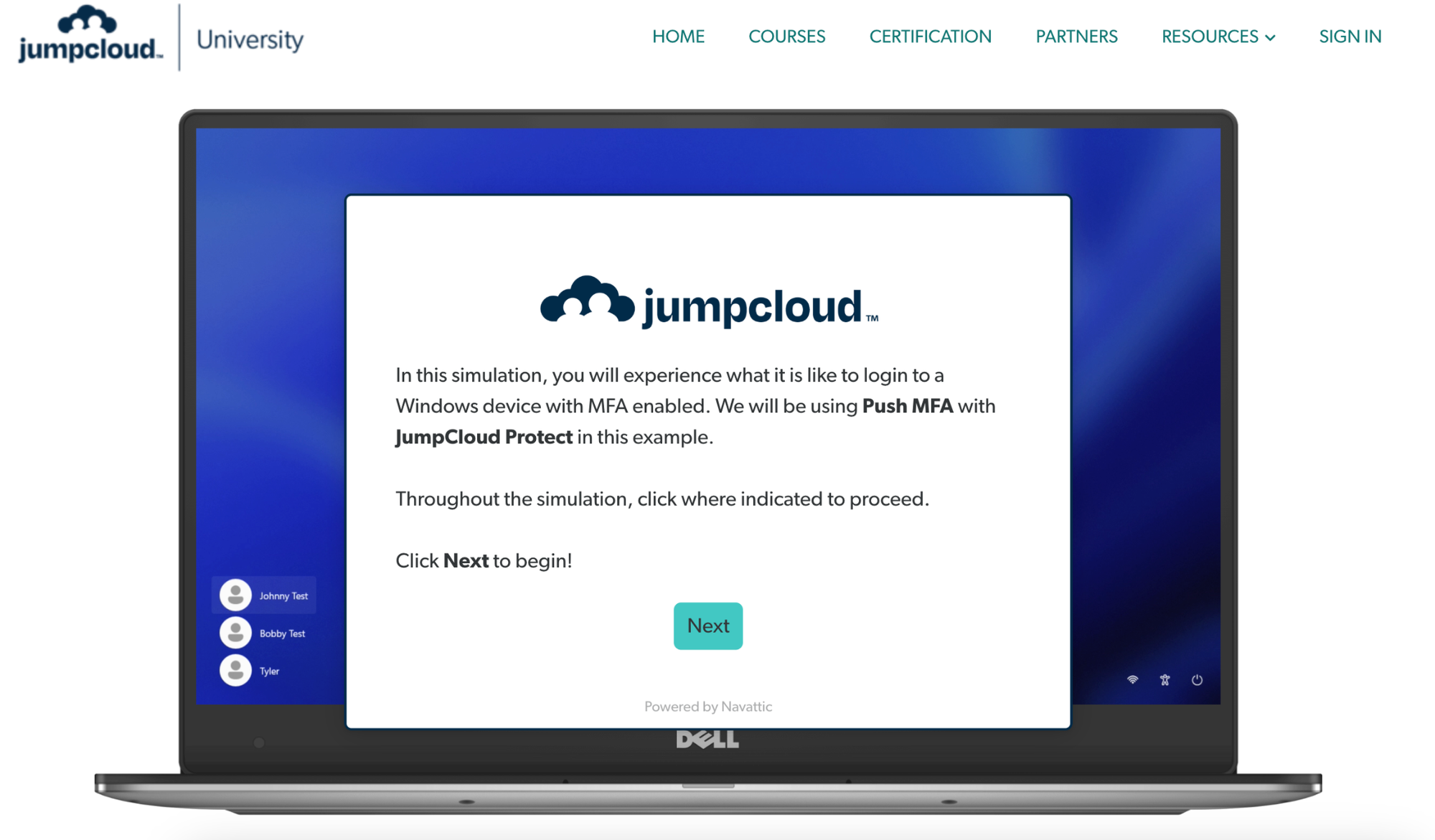
In the demo, admins walk-through the end user experience of logging into their computer and then receiving and approving an authentication verification on their phone. The JumpCloud team even replicates the frame of a laptop and smartphone for extra immersion.
Since the link is public, IT can send employees a link to the demo, previewing the experience before they roll it out to the company.
At the end of the demo, users are invited to check out more guided simulations of JumpCloud functionality or access more documentation pertaining to that use case.
Vitally
Vitally, an all-in-one customer success platform, integrates on-demand video courses with interactive product demos inside its Vitally Academy to educate customers and prospects.
When Academy visitors click into a course, they first see a short video that explains the feature or use case.
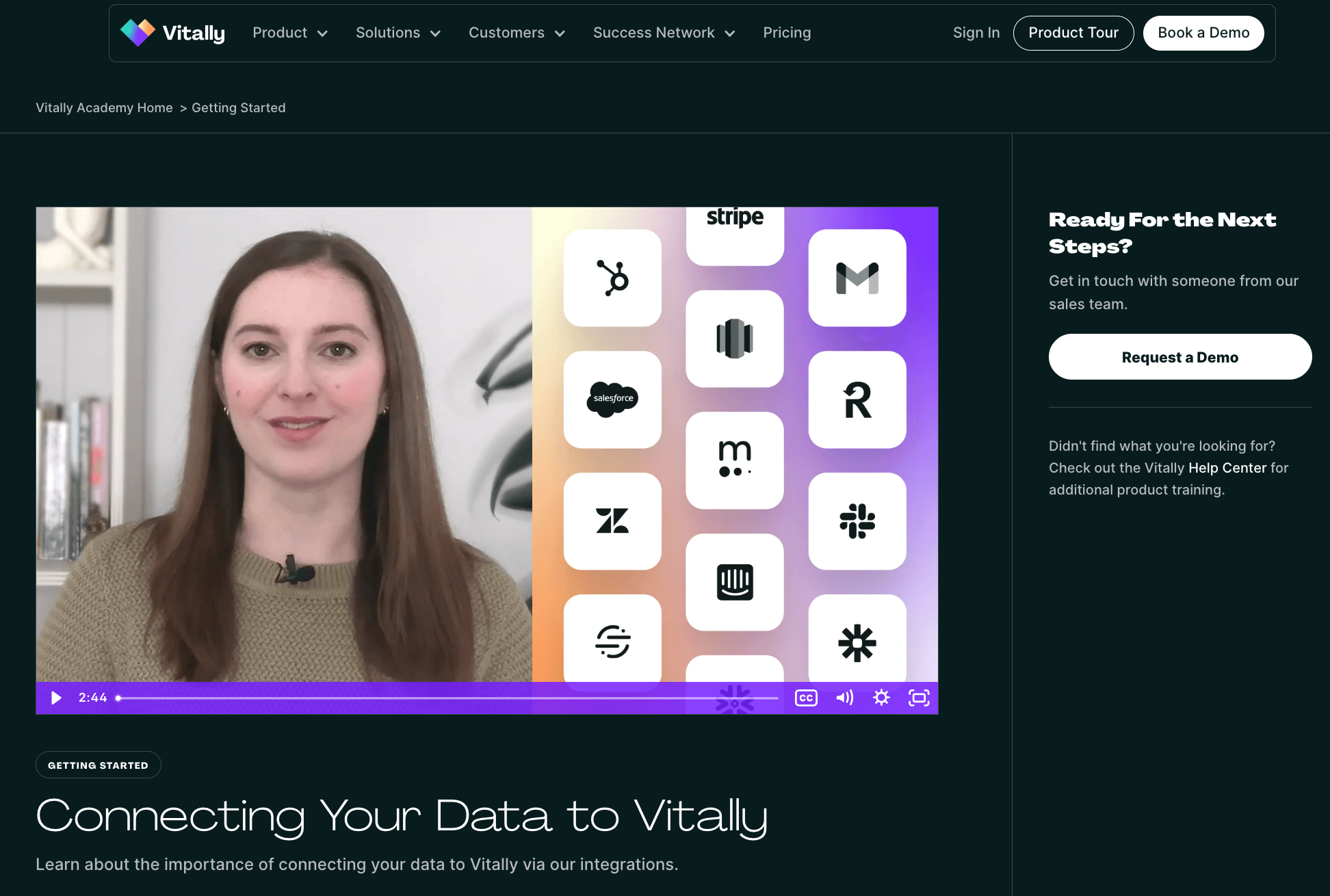
As they scroll down the page, they see a list of interactive demos directly related to the content they just saw in the video, creating an immersive “watch and try” experience.
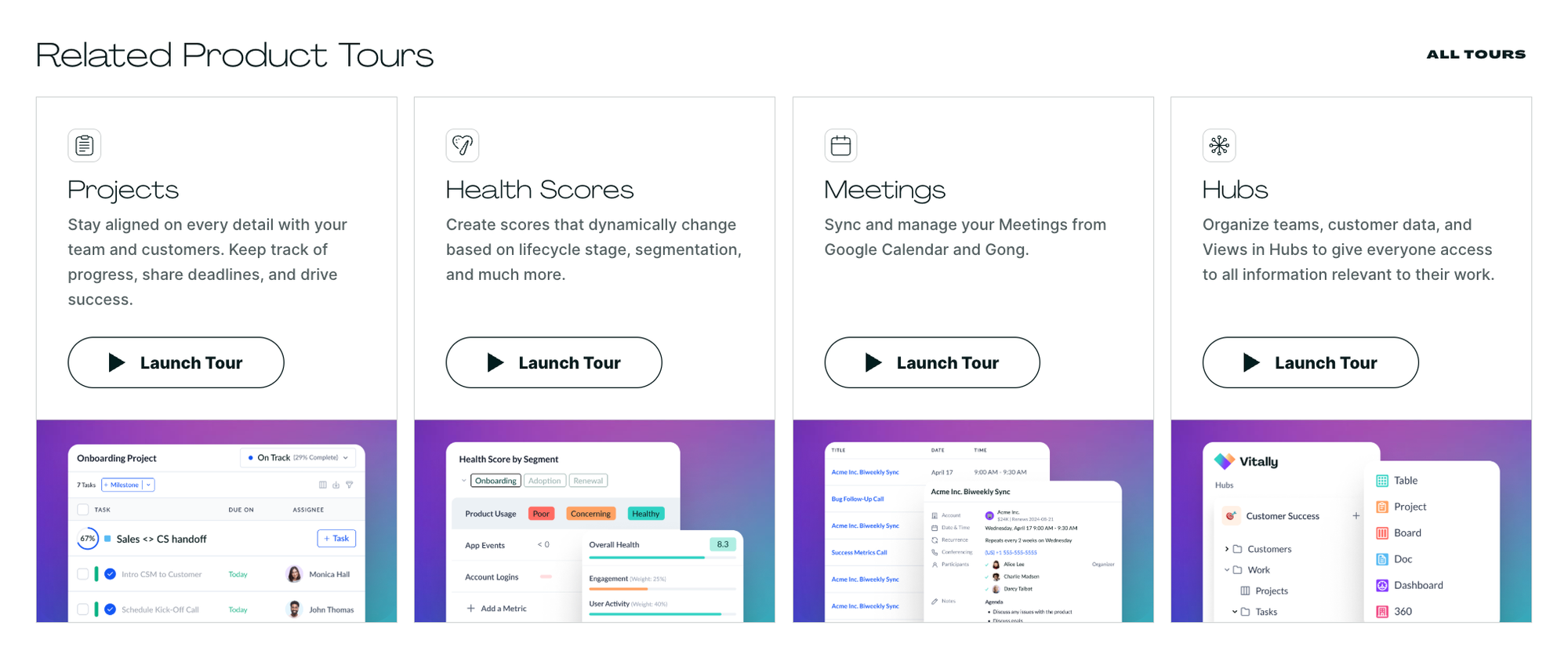
Some interactive tours even start with an embedded video as another intro to the subject before letting the prospect or customer play with the feature themselves.
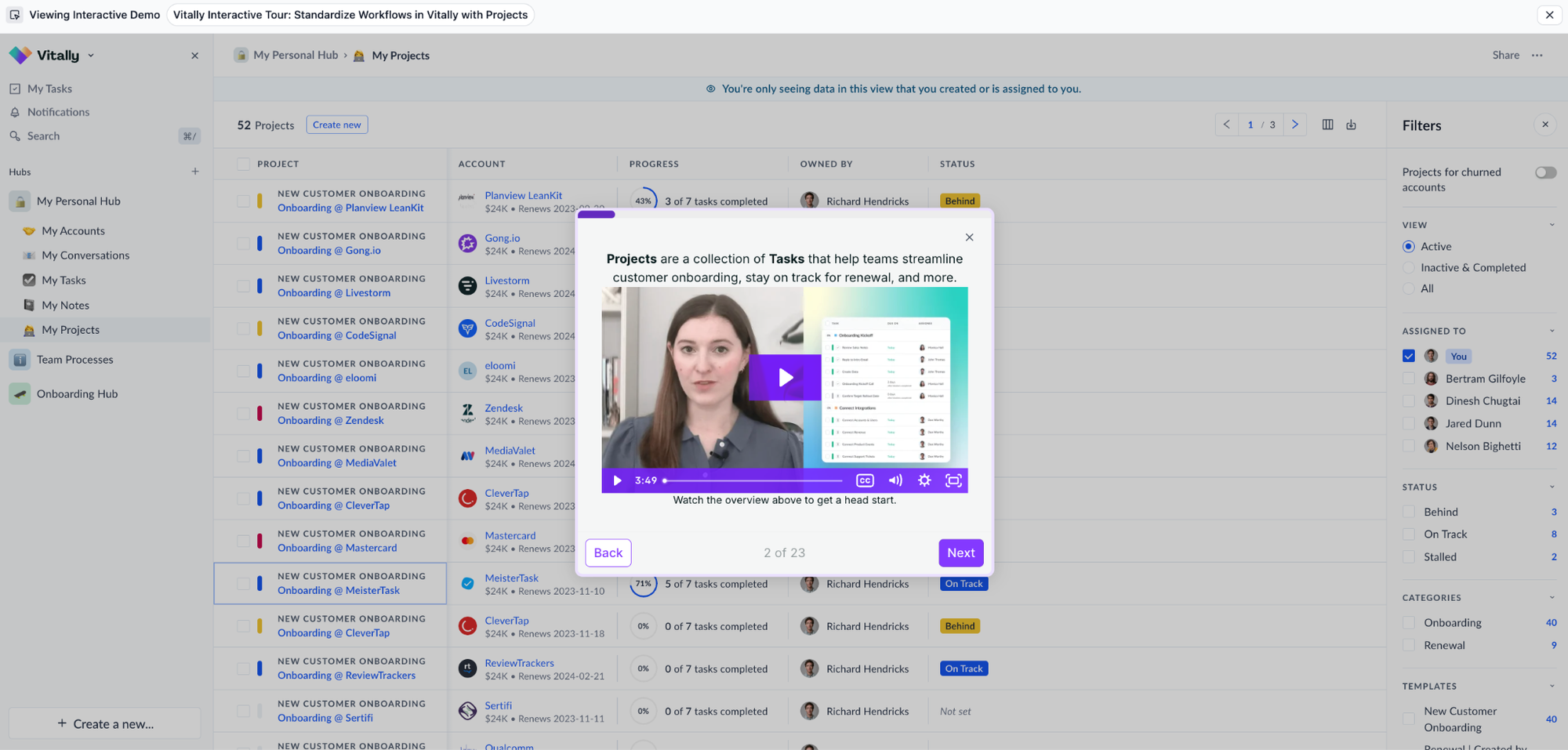
Making the Academy available to anyone who comes to the Vitally website has several benefits:
- It captures interest early. Prospects who may have bounced without the opportunity to try Vitally out themselves can experience it firsthand, often prompting them to book a demo.
- It reduces training overhead. No need to send long documentation or schedule live trainings – Vitally CSMs can just send a link to the Academy and let customers take the courses on their own time.
- It deepens product understanding. Interactive learning usually helps customers grasp key concepts faster and retain them longer.
Want to learn more about mixing product videos and interactive demos? Read about when and how to combine them.
Mixpanel
Mixpanel, a product analytics platform, embeds interactive product demos into its internal customer Academy as well.
Peishan Tan, Head of Customer Success at Mixpanel, explains: “We really wanted to build an entire Mixpanel Academy where we could walk users through how to use the platform. And we didn’t want it to be just text; we wanted interaction. That’s why Navattic is so good.”
In the academy, users get to experience the platform as if they had their own instance, learning how to build funnels and analyze retention, step by step.
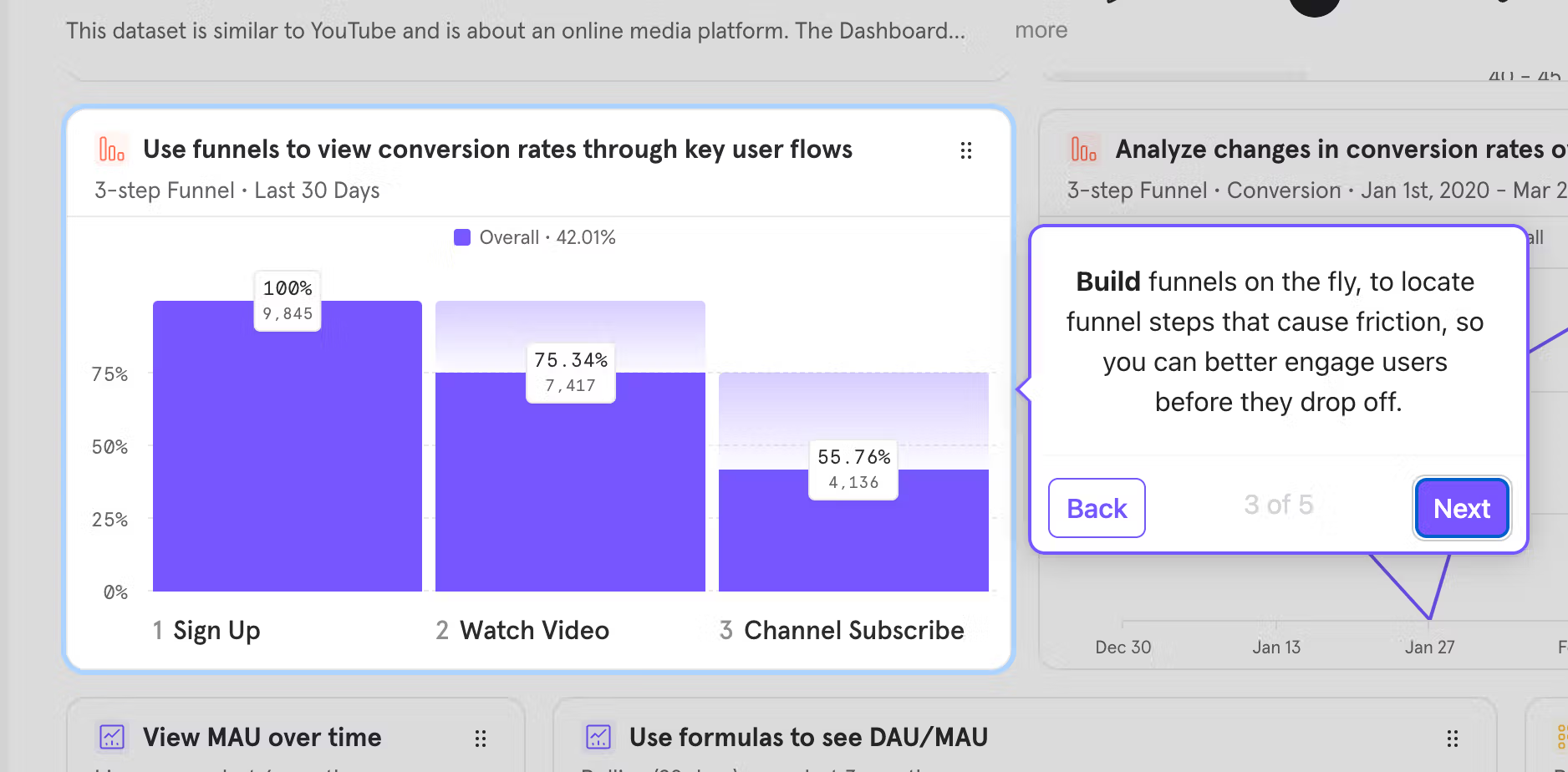
The team found that interactive demos make training far more accessible than static videos. Per Peishan:
“What we liked about Navattic was that users can really go at their own pace. They can click, stop, and follow along on their own screens. Video recordings don’t allow that.”
Guided demos have helped Mixpanel:
- Replace dense help articles with hands-on, experiential learning.
- Speed up onboarding and improve user confidence.
- Reduce support tickets by helping users self-solve common setup challenges.
And they’ve also saved the team a ton of time. Over the past year, they saved roughly 160 hours by building 80 Navattic walkthroughs.
“The efficiency gains have allowed Mixpanel’s CS team to focus less on repetitive video production and more on higher-value initiatives,” says Peishan.
Read more about how Mixpanel uses interactive demos for customer education here.
Want to bring your product to life with AI agents? See how they work.
Turn demos into deals.
Build interactive product demos that engage buyers and close deals faster.