Demo Best Practices for Sales Engineers in 2026

We knew SEs were drowning in repetitive work, we just didn’t realize how bad it was.
For our 2026 State of Demo Automation report, we surveyed 70+ solution engineers and presales professionals at leading B2B SaaS companies.
On average, they said they conduct 7 demos per week.
If a standard demo takes roughly 3.6 hours (including prep), that means SEs are spending anywhere between 11 and 25 hours a week on standard, repetitive demos.
That’s 1 to 3 full business days that could be going toward:
- Customer conversations
- Tailoring presentations
- Ramping new team members
- Building reusable technical content
The best SE teams are figuring out ways to get that time back.
Below, we pulled the most actionable tips from our report, plus tried-and-true tactics from the live event we hosted with our partner, Iris, to help you do the same.
Send a Demo Before the SE Ever Joins the Call
On average, it takes two calls before a prospect ever connects with an SE.
That’s a lot of time for buyers to form an opinion based on what a rep says in a disco call or whatever they could dig up on your website.
Sending an automated demo during that downtime lets people get hands-on with your tool, helping them picture how it fits into their daily work.
As you might imagine, that leads to better sales outcomes.
Our State of Demo Automation data showed that deals where a demo was sent within the first 14 days of deal creation closed at a 72% win rate, compared to 59% for deals with no early demo touch.
Part of that success comes from engaging the buyer early. But it also comes from what you learn from demo data.
On the backend of a demo automation platform, you can see exactly which features users spent time on and which ones they skipped.
Practical Tip
To make sure you have enough data to go on, use an interest-based demo with 3 to 10 interests (e.g., use cases, product lines, or features).
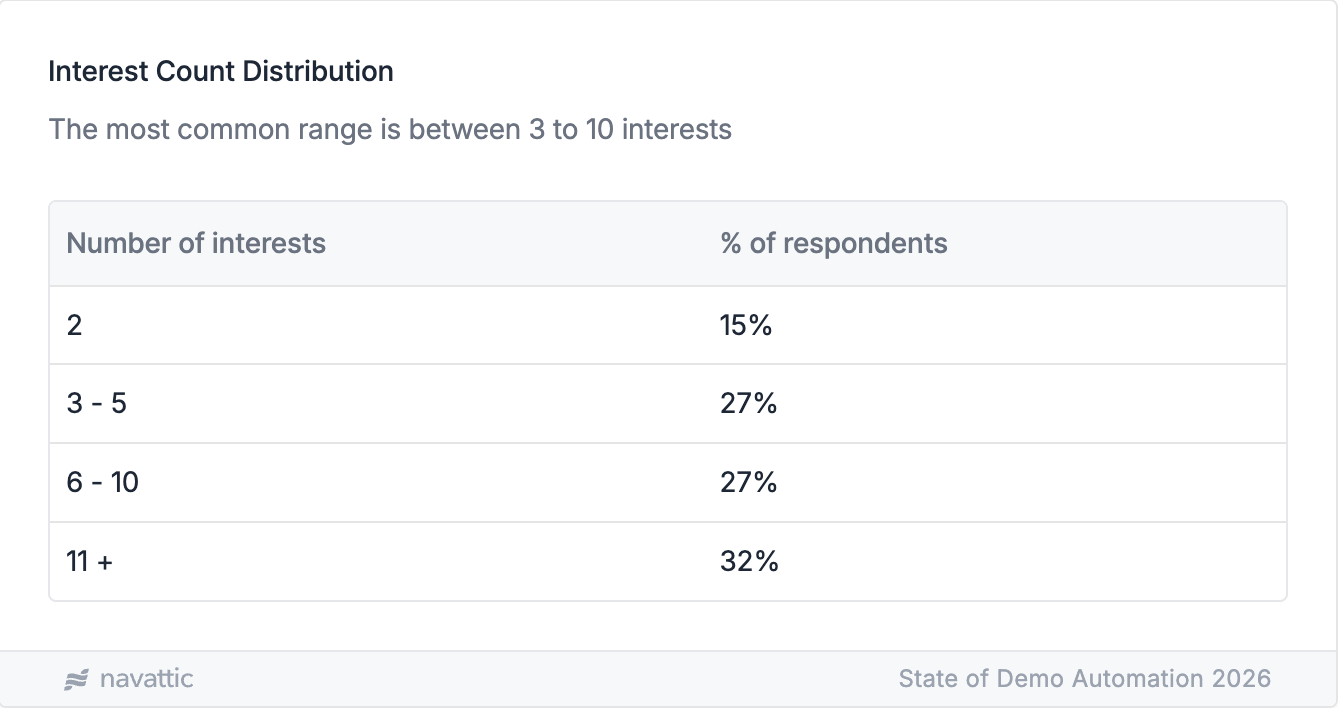
That way, the buyer can better self-select what to explore, and you get the rich qualification data they need to personalize live demos.
Get Multiple Stakeholders Involved
One demo with one person almost never ends with them signing on the dotted line.
In fact, our data shows that the average deal requires 3 demos (4 to 5 is more common) across a 6-month sales cycle.
That means you’re talking to multiple people, each with their own specific buying criteria and motivations.
Mike McDowell, Principal Solution Marketing Manager at UserTesting and author of Demotainment, explains:
“Product demos rarely have a single audience. You might be presenting to a hands-on practitioner, a skeptical IT lead, and a budget-conscious VP, all at once.”
He recommends opening your live demos with content that’s relevant to the full group, then weaving in targeted moments that speak to specific roles.
“Verbally signal those shifts so no one feels excluded, and watch the room. If someone looks puzzled or lights up, invite them in.”
Practical tip
Send a follow-up self-serve demo after each call so people can:
- Try to replicate what they just saw in the live demo, and
- Share it with their colleagues, who might still be skeptical.
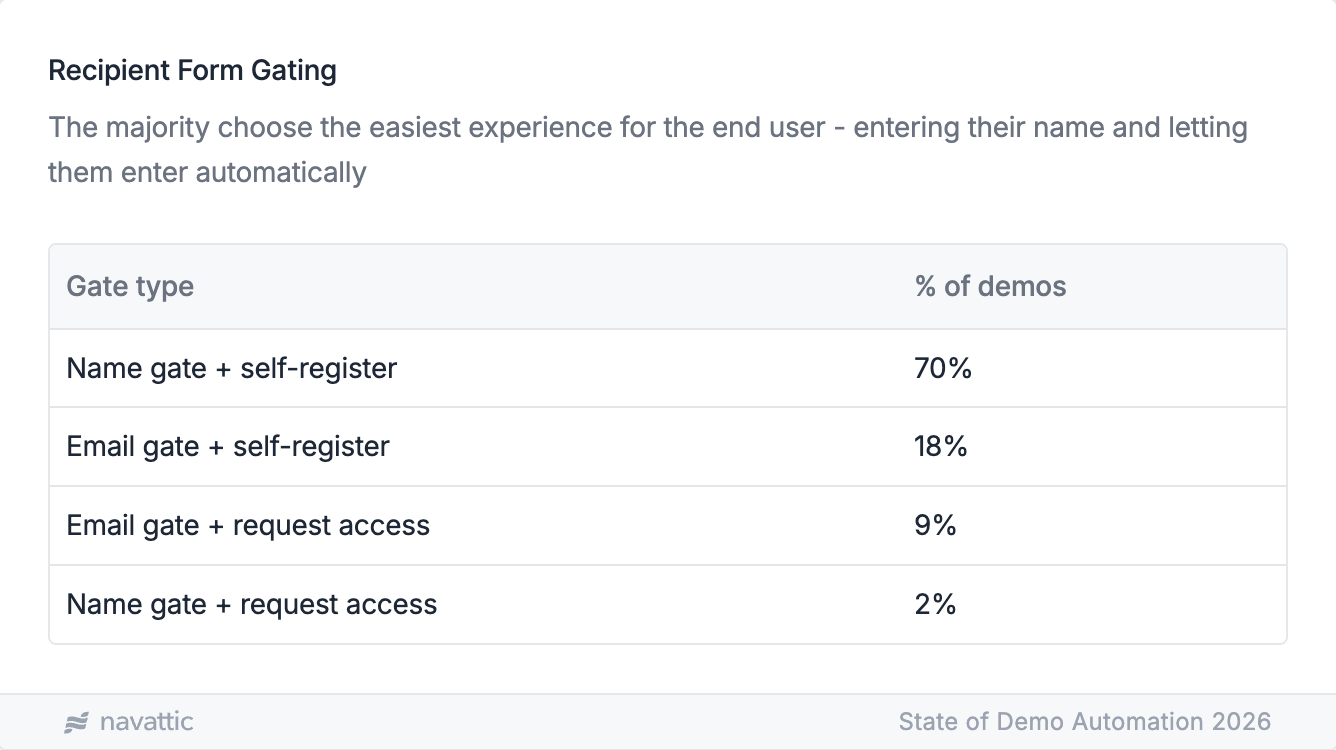
To make demos as easy as possible to share, name gate only.
70% of automated demos on Navattic take this frictionless approach.
You can always find new stakeholders on LinkedIn or just ask the champion for a quick rundown to tailor your next steps.
Personalize Your Intro or Leave-Behind Demos (Even Just a Little)
Nobody wants to click through an interactive demo that was clearly built for someone else.
Adding a welcome video, swapping in industry-specific data, and selecting relevant use cases for your interactive demos can be the difference between buyers staying engaged and zoning out.
Demos with personalized data have an 48% higher view rate than demos that weren’t edited at all (29% versus 15%).
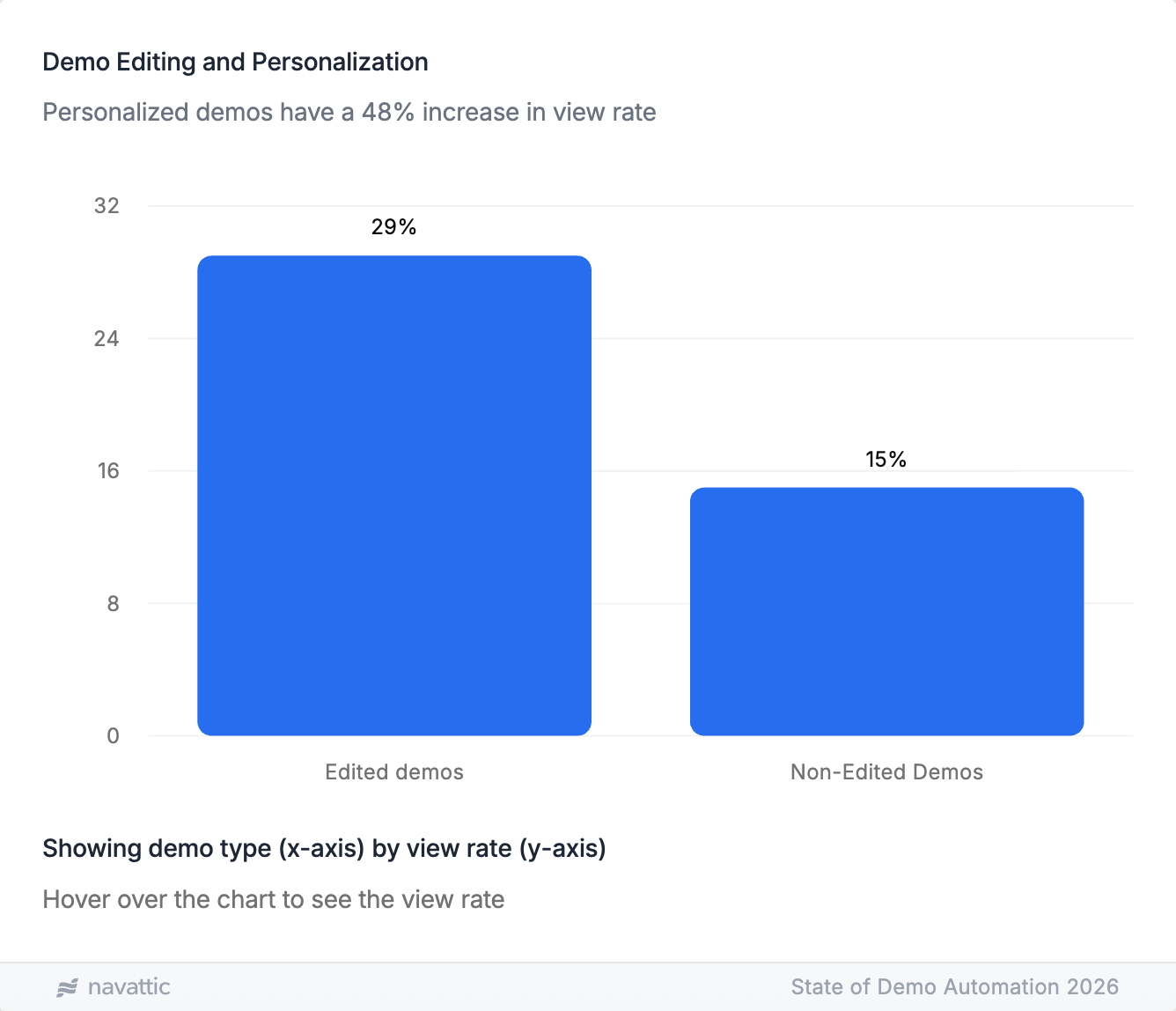
Yet over a third (34%) of the SEs we surveyed say their standard demo has little to no customization.
Practical Tip
Make at least a few tweaks to your interactive demos. It takes minutes to show that you care about the person on the other end.
Have a Backup Plan
No matter how much you prep, there will always be days when things don’t load, time out, or bugs you’ve never seen before randomly appear.
Part of the reason things break is that demo environments are hard to maintain.
Our data showed that, while the majority of SEs have a dedicated demo environment, just 39% have dedicated resourcing to maintain it.
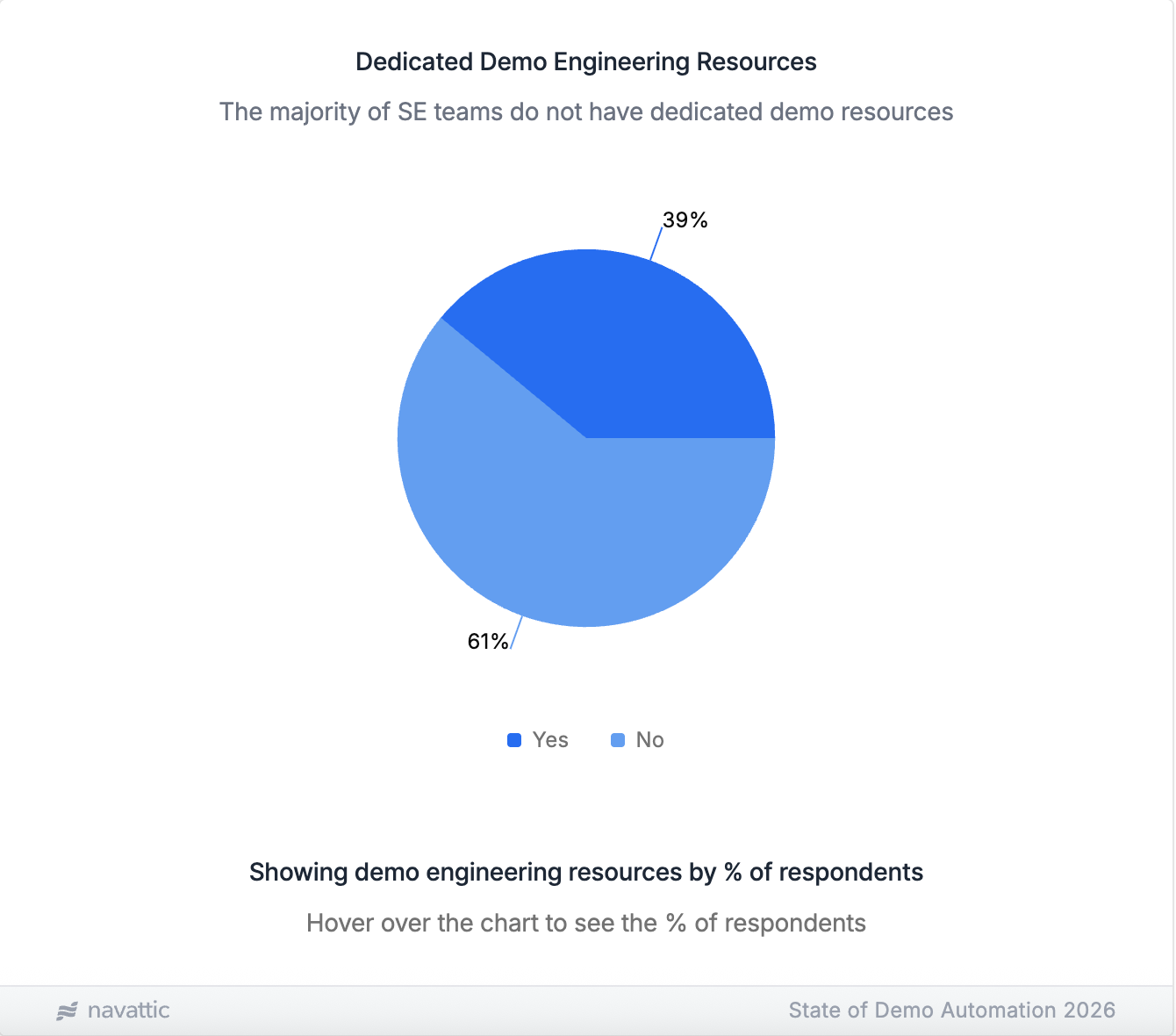
On average, maintaining demo environments takes 3 hours a week per person, and 41% of SEs refresh them manually.
That’s a lot of time spent on something that can still fail mid-call.
Building a bank of screenshots, prerecorded videos, or interactive demos takes minimal effort, and having them on hand can save the day.
“If a feature doesn’t load, you need to be able to pull up a screenshot, walk through the key benefits, and communicate its value,” Mike points out.
Practical Tip
Have a sandbox demo environment queued up in a different tab before you hop on a call.
If something breaks, you can switch over easily, and it still looks like you’re moving through the product.
Tell Buyers a Story
Prospects want a story, not a sales pitch.
They want to hear how someone like them dealt with the same problems and overcame them with your product.
To do that, borrow Mike’s storytelling framework:
- Ground the story in a real character, maybe a prospect you talked to last quarter, or perhaps even yourself, if you were a former customer.
- Outline the situation and emphasize the pain they faced. What was the problem underneath the problem?
- Walk through how your product helped, whether it saved them time, reduced errors, or improved efficiency. And be sure to include what didn’t work – authenticity matters more than polish.
Practical Tip
Consider interest-based demos the structural version of this.
Instead of walking every buyer through the same linear path, you let them choose the use cases and features that actually apply to them.
It’s why 84% of self-serve demos shared during the sales cycle are already set up this way.
Looking for more ways to get time back without sacrificing demo quality?
Grab the full State of Demo Automation report or read How to Run Impactful Product Demos.
Turn demos into deals.
Build interactive product demos that engage buyers and close deals faster.