How to Move Beyond SaaS Product Demo Videos [Plus Product Video Alternatives]

Product demo videos have become commonplace in recent years.
According to a report from video marketing firm Wyzowl, 89% of businesses use video as a marketing tool, and 68% of marketers who don’t use video say they plan to start using video in 2025.
That’s because more and more, prospects want to see a product in action on their own time — they don’t want to wait for your sales team to get back to them with a traditional demo.
But video alone is no longer enough. Today’s buyers expect hands-on, interactive experiences that give them a real sense of how your product actually works.
In this article, we’ll explain the rise of product demo videos and why you might want to consider an alternative for your business.
What is a typical product demo video?
A product demo video showcases a particular set of product features in action. Usually, product demo videos start by acknowledging common customer pain points and then show how the product resolves them.
Because they can cater to multiple audiences, product demo videos are used on company websites, in social media posts, and as demo follow-ups.
Downsides of SaaS demo videos
With the rise of product-led growth, videos have become an increasingly popular marketing tool for SaaS companies.
But there are some distinct ways SaaS demo videos fall short of other go-to-market activities. So below, we’ll explore several reasons why you might want to reconsider product demo videos.
Engagement
Product demo videos don’t enable leads to interact with your product — a key element of a product-led sales process.
So while prospects gain some information about the product and how it works, they often watch videos passively or barely at all.
In fact, Peep Laja, founder of Wynter, a B2B message testing platform, found that on an average site, only 10 to 15% of visitors watch the product video.
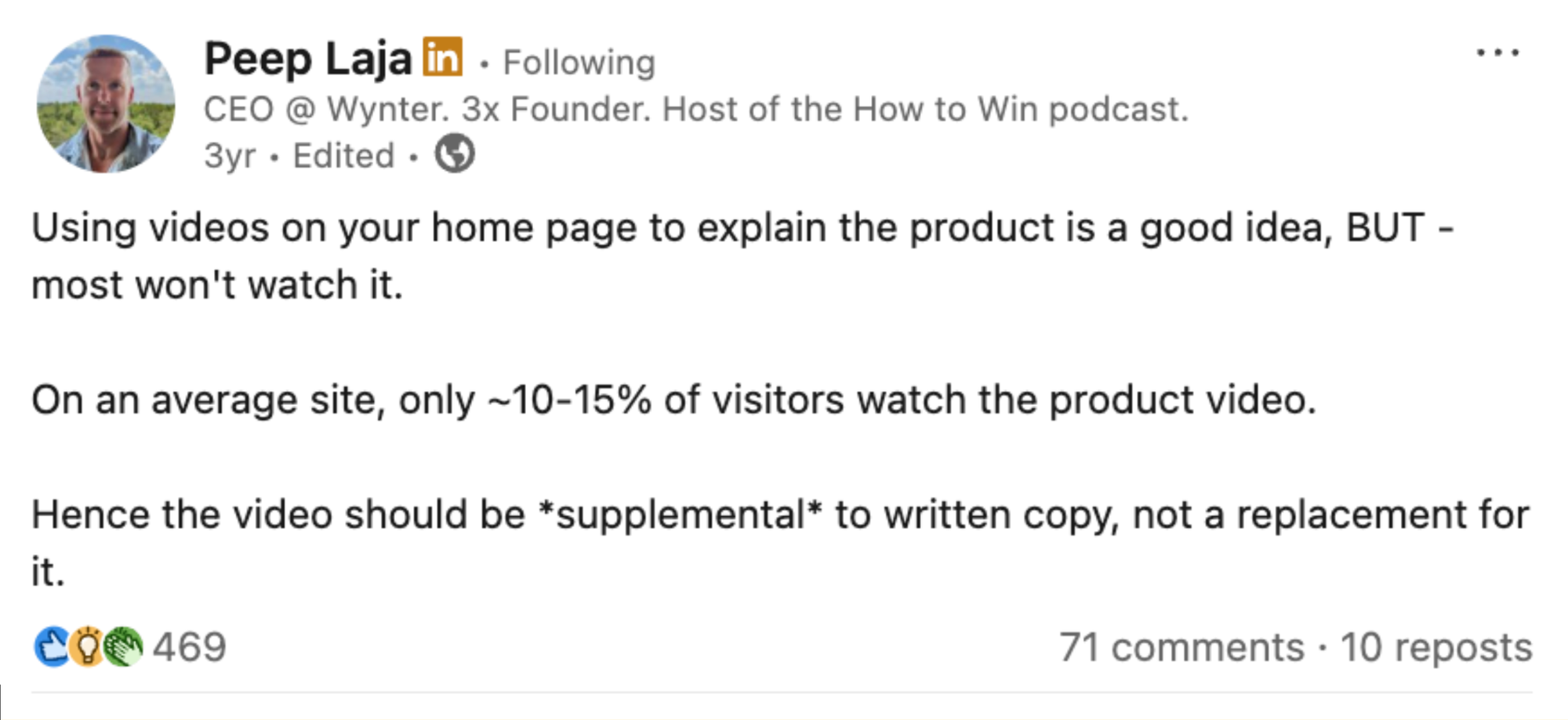
When asked how he arrived at the 10 - 15% figure, Peep shared,
“My source of data is seeing the analytics of hundreds of companies through our consulting business, Speero. Video play rate is measured, and it’s consistently within the 10-15% range. I’m sure outliers exist, too.”
Part of the reason why product videos get so little engagement is that they aren’t customized to prospective customers’ needs.
It takes time and money to create even one product demo video, so, unfortunately, many are “one size fits all.” And if a prospect doesn’t see features that are interesting to them, they’ll probably stop watching.
Interactive demos, on the other hand, catch people’s attention – and keep them engaged.
In our 2024 State of the Interactive Product Demo, we found that the top 25% of interactive demos outperformed videos by 2.5x.
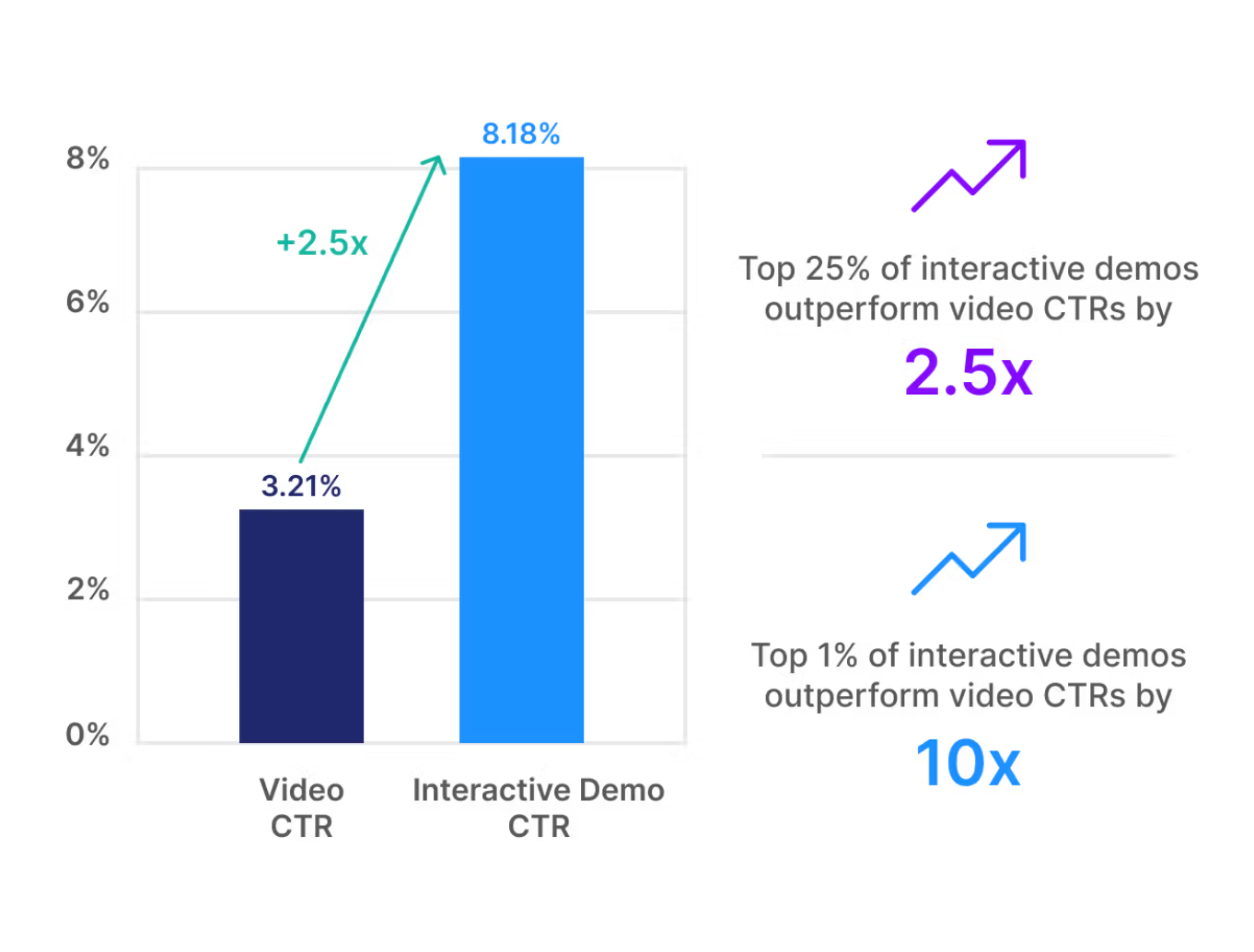
And the top 1% of interactive demos outperformed video click-through rates by 10x.
Cost
High-quality videos require skilled in-house creative teams — who are often pressed for time — or an external agency that specializes in video production and editing.
The average cost to produce a product demo video is between $1,000 and $3,000 per finished minute. Costs include filming, editing, and rendering.
If you want cream-of-the-crop narrators or instructors, videos can cost closer to $5,000 per minute. Adding animations can hike the total costs to $10,000.
Time
Just one video can be a significant drain on multiple team members.
It takes time to get your thoughts down on paper and turn them into a more formal script. People on the sales, product, and customer success teams may want to weigh in, and more technical videos may require an additional time commitment from product SMEs.
That doesn’t even include finding a talented voiceover artist, deciding on music and sound effects, or even the actual recording or editing.
Even for expert agencies, it takes a minimum of one month to produce a top-notch video.
Obsolescence
Product features can quickly become out of date.
Larger companies, for example Salesforce, typically change their UI 3 times per year, but if you work at a startup, you know things can evolve much faster. Small companies may deploy software updates as frequently as every month.
Redoing your product demo videos every time there is an adjustment is an overly expensive and time-consuming process. But not refreshing your videos means you risk people not knowing about features that may have prompted a conversion.
Navattic customer Mixpanel faced this exact problem while trying to build evergreen training materials for its customers.
Peishan Tan, Head of Customer Success at Mixpanel, shares, “Within two months, the UI would change again, and we’d say, ‘Oh my god, this video is outdated. We need to update it again.’ The CS team didn’t have time to keep re-recording everything.”
Alternative to Product Demo Video: Interactive Product Demo
While videos are great for storytelling, interactive demos turn that story into a hands-on experience.
An interactive product demo is a walkthrough of your product that allows prospects to get hands-on experience with your product when it’s convenient for them.
No code product demo software helps you guide prospects through key features of your product and customize them in a way that highlights features that will be of particular interest to particular personas.
Mixpanel turned to interactive demos when they realized that they couldn’t scale enablement with videos alone. As Peishan put it:
“Large enterprises would come to us and say, ‘I need training. I need training.’ Every time new users joined, it added strain on the CS team, and it just wasn’t scalable.”
The company’s marketing team suggested an alternative: Navattic.
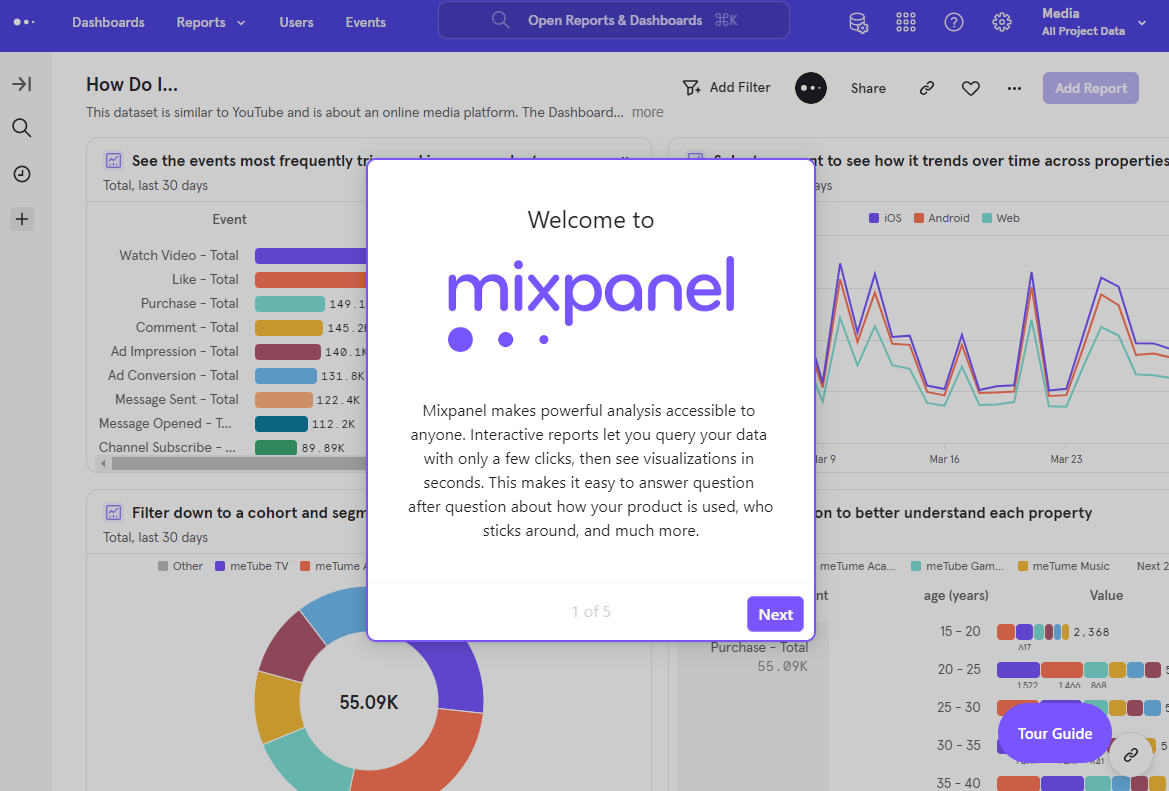
Since then, the team created their entire Mixpanel Academy using Navattic. And, conservatively, she estimates it saved them over 160 hours.
When and How to Combine Product Videos + Interactive Demos
Just because you decide to add interactive demos to your marketing, sales, or customer success strategy doesn’t mean you have to ditch product videos completely.
In fact, we recommend keeping product videos as part of your TOFU approach to drive awareness.
From there, you can use Navattic’s AI Copilot to convert that video into an interactive demo that can be used in live demo follow-ups, nurture campaigns, and even customer onboarding flows.
| Use Case | Best Approach | Example |
|---|---|---|
| Top-of-Funnel Awareness | Use a short product demo video | Homepage or ad asset |
| Mid-Funnel Engagement | Convert that video to an interactive demo via Copilot | Create a guided, clickable version for deeper engagement |
| Customer Education | Blend short clips with embedded interactive flows | Vitally Academy uses videos + product tours |
| Sales Enablement | Personalize demos with video intros | SEs record quick intros, then attach Copilot-generated interactive demos |
| Onboarding | Replace long videos with interactive walkthroughs | Peishan’s team swapped 10-min onboarding videos for 2-min clickable demos |
Customer Example: Integrating Product + Video
Vitally, an all-in-one CS platform, has a wide set of on-demand courses – each of which includes pre-recorded video clips and embedded product tours.
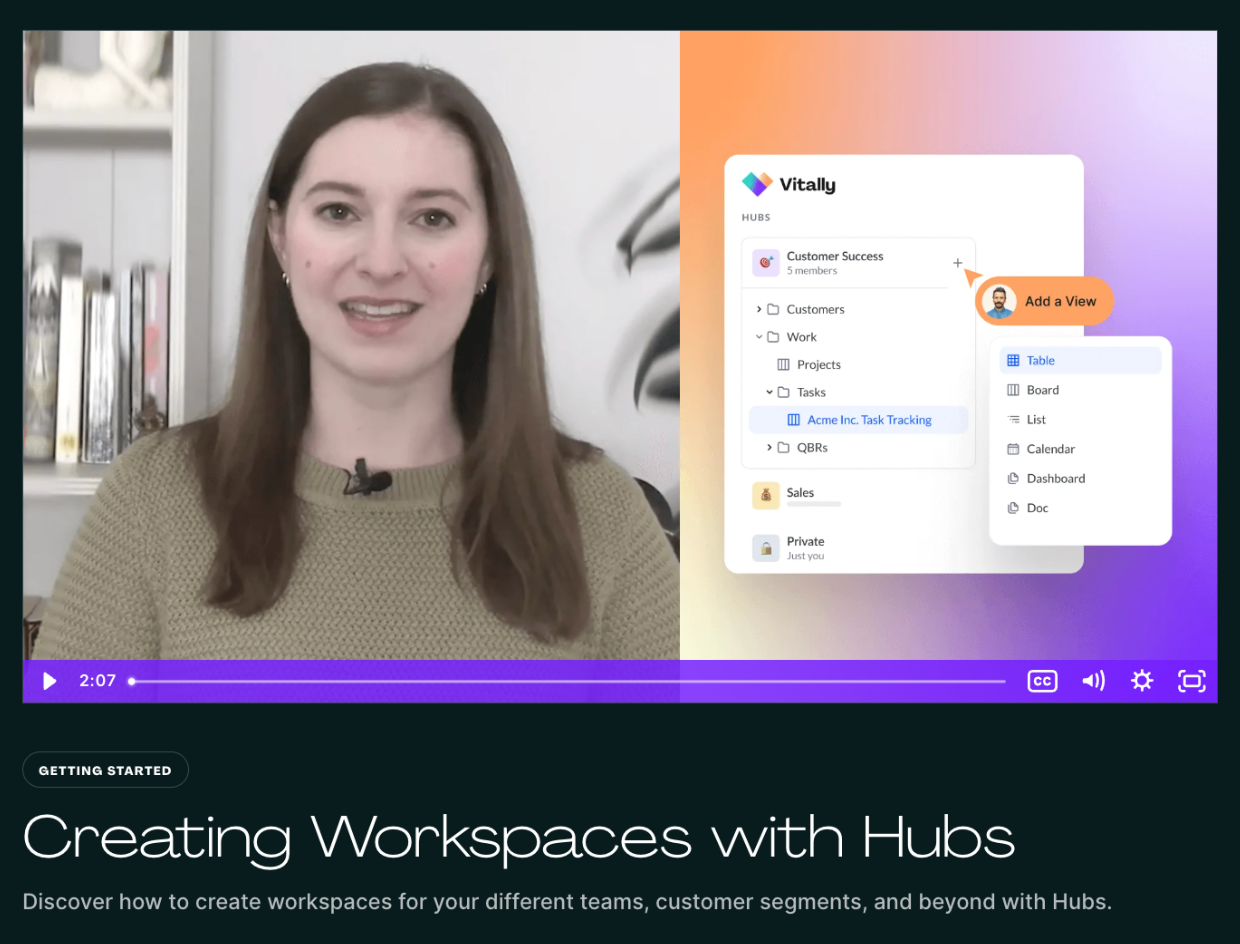
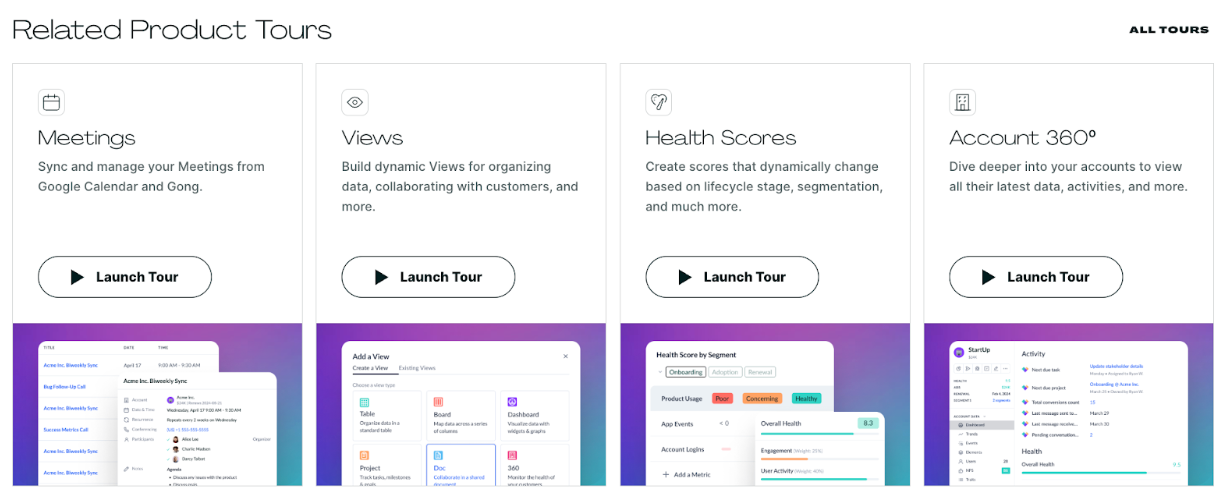
Going this route lets users see a preview of the feature or use case they’re about to explore firsthand, orienting them and getting them excited to try it.
Why switch to an interactive product demo
Interactive product demos come with the potential to boost engagement, brand awareness, conversion rates, and more.
Interactive
At Navattic, we’ve found that the best-performing demos have a 30% - 40% - engagement rate on average. But we’re not the only ones who’ve observed this pattern.
In a recent webinar, G2 cofounder, Tim Handorf, explained that prospects are 2 - 3 times more likely to click on an interactive demo than on a screenshot or video. And TrustRadius finds that buyers spend an average of 40 more minutes reading reviews after interacting with an interactive demo.
Why? Because interactive product demos allow you to give people options. Demos can include a checklist throughout that lets prospects skip directly to the parts they care most about.
That helps the sales lifecycle run much faster. Reps don’t have to waste time at the beginning of calls with level-setting questions, they can jump straight to what they do best — discovery and tailoring the demo to that prospects specific needs.
In contrast to videos, demos encourage users to get their feet wet, experiencing the product themselves.
Peishan at Mixpanel emphasized: “What we liked is that users can really go at their own pace. They can click, stop, and follow along on their own screens. Video recordings don’t allow that.”
Even better, the Mixpanel team is using AI to instantly transform their old video content into interactive flows, letting prospects ‘click through’ the same journey they once only watched.
Speed
Interactive demos take far less prep time than videos.
The team at Mixpanel saves roughly two hours on every video. “The efficiency gains allowed Mixpanel’s CS team to focus less on repetitive video production and more on higher-value initiatives,” Peishan shares.
That means interactive demos can go live in days, not weeks: a key advantage for fast-moving SaaS teams with frequent UI updates.
And, according to TrustRadius, interactive demos also speed up the sales cycle — cutting the average time to close by 2 weeks.
Easy to update
One of the best parts about interactive product demos is that updating them to match your recent releases is quick and easy. Rather than starting from scratch, you simply insert new screen captures.
With Navattic’s Table AI features, the editing process is even easier.
Just write a simple text prompt like, “Please convert all these prospects to insurtech companies,” and Navattic will bulk update data within your captures for you, a level of flexibility that’s not possible with video content.
The team at Traackr, the leading intelligence platform for data-driven influencer marketing, explains that:
“Overall [interactive demos] are a better experience for us and our audience compared to video content because Navattic interactive demos are easier to create, update, and click through for end users.”
And the easy updates have paid off. Over the past few months, Traackr had, “Thousands of prospects visit our Navattic walkthroughs to experience product functionality firsthand.”
The best part is that Traakr has heard from prospects that their tours are engaging and a great preview of the product, making for a much more effective sales process.
Jason agrees — in his G2 review, he applauded Navattic’s ease of use:
“Navattic has made it so easy to create interactive product tours. Instead of relying on product videos that are quickly outdated and time-consuming to change, Navattic gives us a way to create an engaging product experience and make changes on the fly.”
Trackable
Unlike demo videos, interactive product tours can reveal who is test-driving your product and what features they are most interested in.
In Navattic’s Analytics Dashboard, you can see information like:
- How many unique visitors came to your demo
- How long they spent on your demo
- How many CTA clicks your demo got
- What your click-through rate was
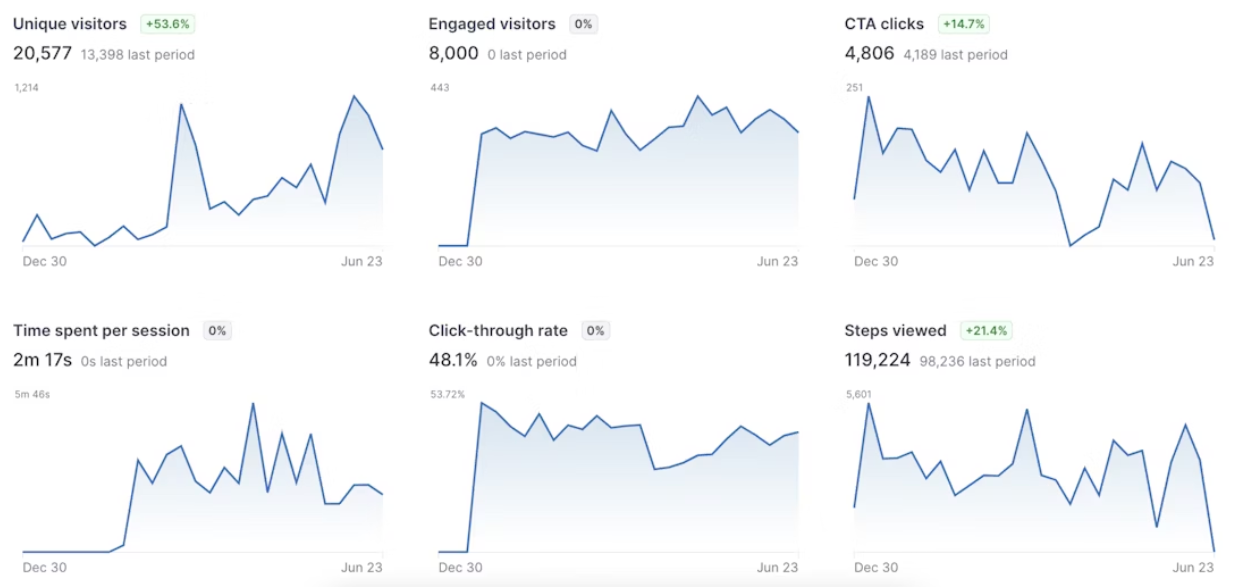
Observing prospects’ behavior can tell you a lot about what might convince them to make a purchase and what new features might be worth incorporating into your product in the future.
To get even more precise about who is interacting with your demos, you can install Navattic JS, a script that identifies and tracks demo visitors and integrates with the existing identity layer of your application or website.
From there, you can directly funnel the most engaged prospects to sales (along with a description of their demo behavior) so reps can better tailor their demos to what real visitors actually want to see.
Ready to start your interactive product demo journey? Try Navattic for free.
Turn demos into deals.
Build interactive product demos that engage buyers and close deals faster.