How to Use Qualified and Navattic Agents Together

Chatbots aren’t new, but they’re having a bit of a resurgence with AI.
Because instead of going through a clunky if/then tree just to get an answer about something as basic as pricing, prospects can now have a real, personalized conversation.
Tools like Qualified, for example:
- Kick off a conversation by asking about the visitor’s use case
- Adapt responses to the person’s role and needs (even go on tangents)
- Share relevant product videos, tutorials, and case studies
- Pass the visitor off to a human, with all of the context included
What chatbots like Qualified can’t do, though, is walk people through your product. Which is why we are seeing more teams pair a chatbot with an interactive demo agent.
Below, we share how companies are effectively combining the two and how Navattic Agents bring chat and demos into a single experience.
How Companies Use Chat Tools Like Qualified Today
Qualified is best known for its AI SDR agents (aka chatbots).
When someone comes to your site, a chatbot pops up in the bottom-right corner. That agent is attempting to:
- Identify the visitor
- Determine whether they match your ICP
- Engage accordingly (asking discovery questions, sharing resources, etc.).
After the chat ends, Qualified pushes the data it’s collected to your CRM and routes the lead to the right rep – who can mine the data for clues on how to follow up.
AI SDRs are a solid way to recognize, qualify, and route warm leads, but as we’ve pointed out, they can’t show your product. And most prospects want to see the real thing working in real time.
Integrating Qualified with interactive demo tools like Navattic can give leads a more hands-on product experience – while still preserving the qualification and routing that chatbots are good at.
Chatbots + Product Tours: How Customers Use Them Today
Chatbots and tours each have their pros and cons. Here’s what they’re great for and where they fall short.
Standalone Chatbots
Best for: Giving website visitors instant answers to commonly asked questions.
They’re an easy way for teams with low GTM bandwidth to communicate with and qualify prospects.
Cons
- They can’t show the product. They can only talk about it or share links to product content.
- They can feel a little scripted. The best AI SDRs are only as good as the content they’re fed. If a prospect asks something super specific, you risk giving a vague answer or prematurely sending the prospect to your sales team.
Standalone Product Tours
Best for: Showing off your product on your website.
In fact, over half (52%) of the top 1% of demos are placed in multiple website locations.
Prospects like that they can get a sense of what your product can do without having to talk to your sales team.
Cons
- They can’t converse with a person. They’re a static, step-by-step walkthrough.
- They don’t have the same built-in qualification and routing features chatbots do. You can set up Slack playbooks and review your interactive demo data, but these require some setup.
Chatbots and Product Tours Together
Navattic has a native integration with Qualified (and with Drift), so combining interactive demos and chat only takes a few clicks.
Our customers use Navattic tours and chatbots together to:
- Serve up interactive demos as a way for prospects to explore your product
- Add chat inside of an interactive demo, so prospects can ask questions mid-tour
- Bring interactive demos into an in-app chat to show existing customers or freemium users a specific part of the product
You can also use Navattic Agents instead of Qualified to converse with prospects and show the product. Skip ahead to learn more about Navattic Agents.
Below are a few examples:
Emplifi
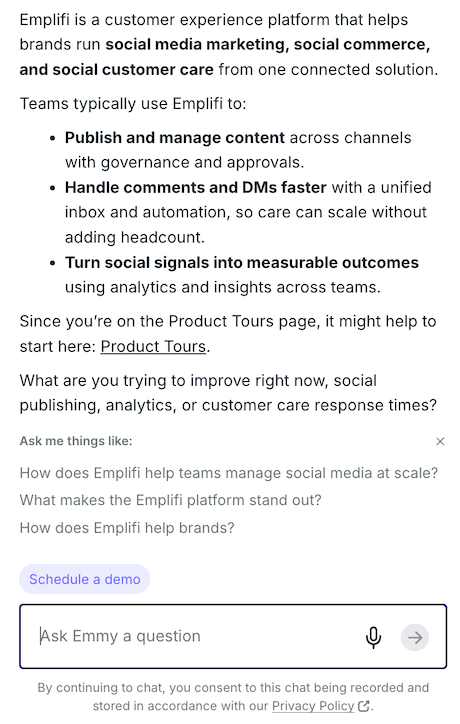
Navattic tours are the go-to CTA for Emplifi’s Qualified chatbot.
When prospects ask basic questions like, “What is Emplifi?” they get a written overview of what the platform is and what customers typically use it for, followed by a link to Emplifi’s library of product tours:
On the product tour page, users can search for the type of demo they want to see (interactive demo or product tour) and filter by product and team.
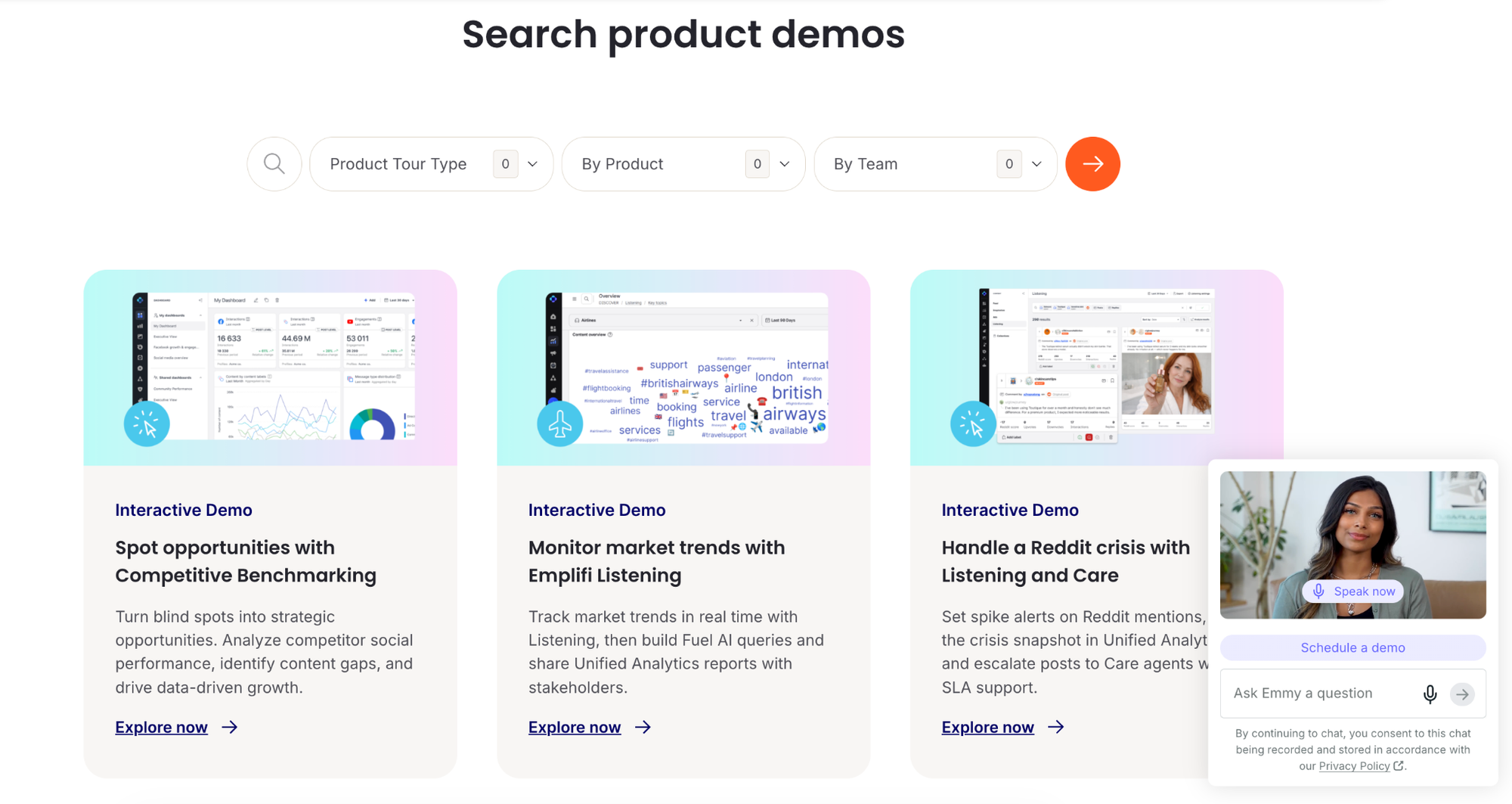
The Qualified agent stays in the bottom-right corner in case they need help or direction.
MagnitGlobal
MagnitGlobal took the opposite approach – rather than surfacing tours via chat, they embedded a Qualified chatbot into their product demos.
When someone lands on the product tour page (linked under “Resources” in the main nav), they’re invited to take a tour of a specific use case.
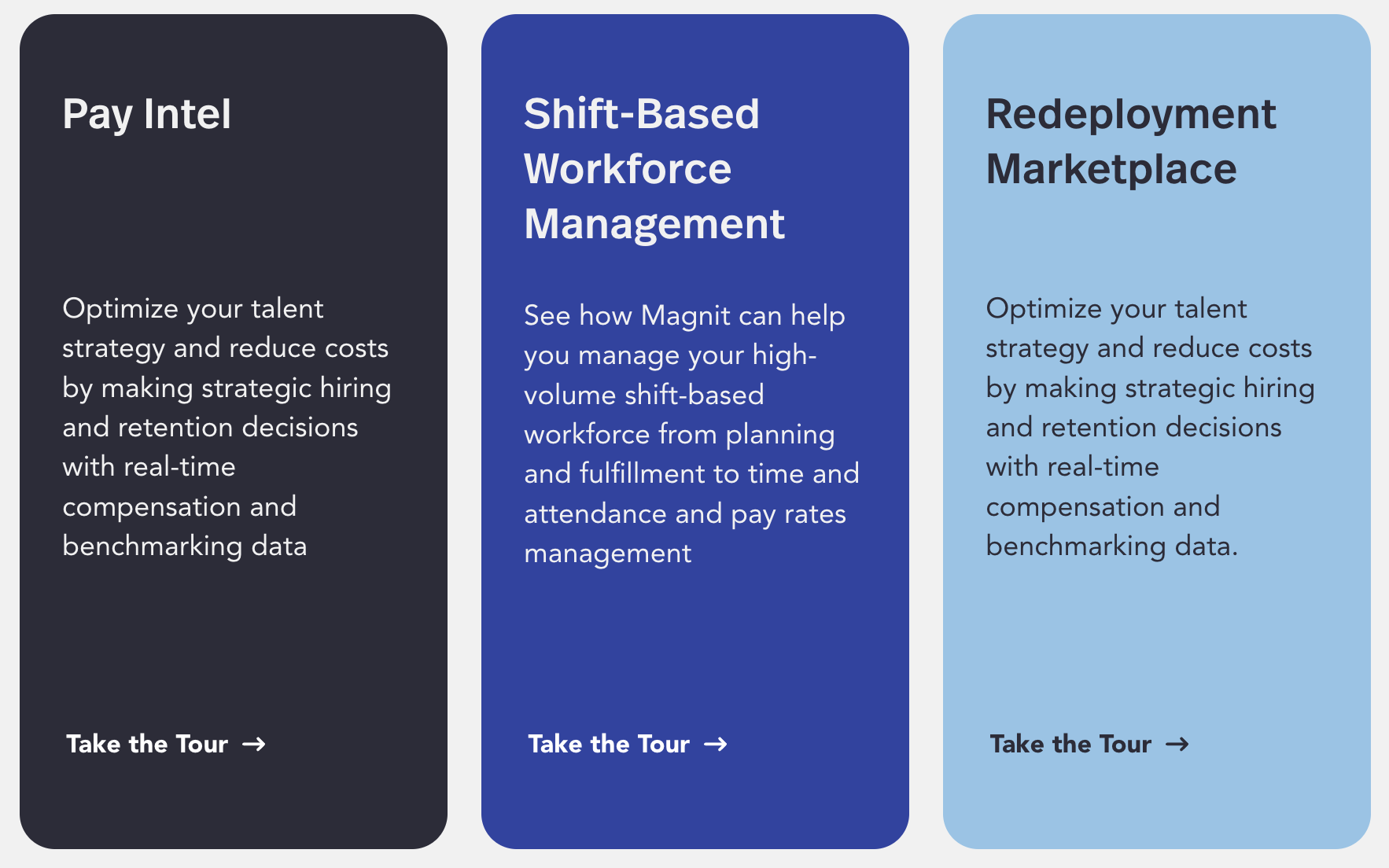
Clicking the “Take the Tour →” button opens a new tab and launches an interactive demo.
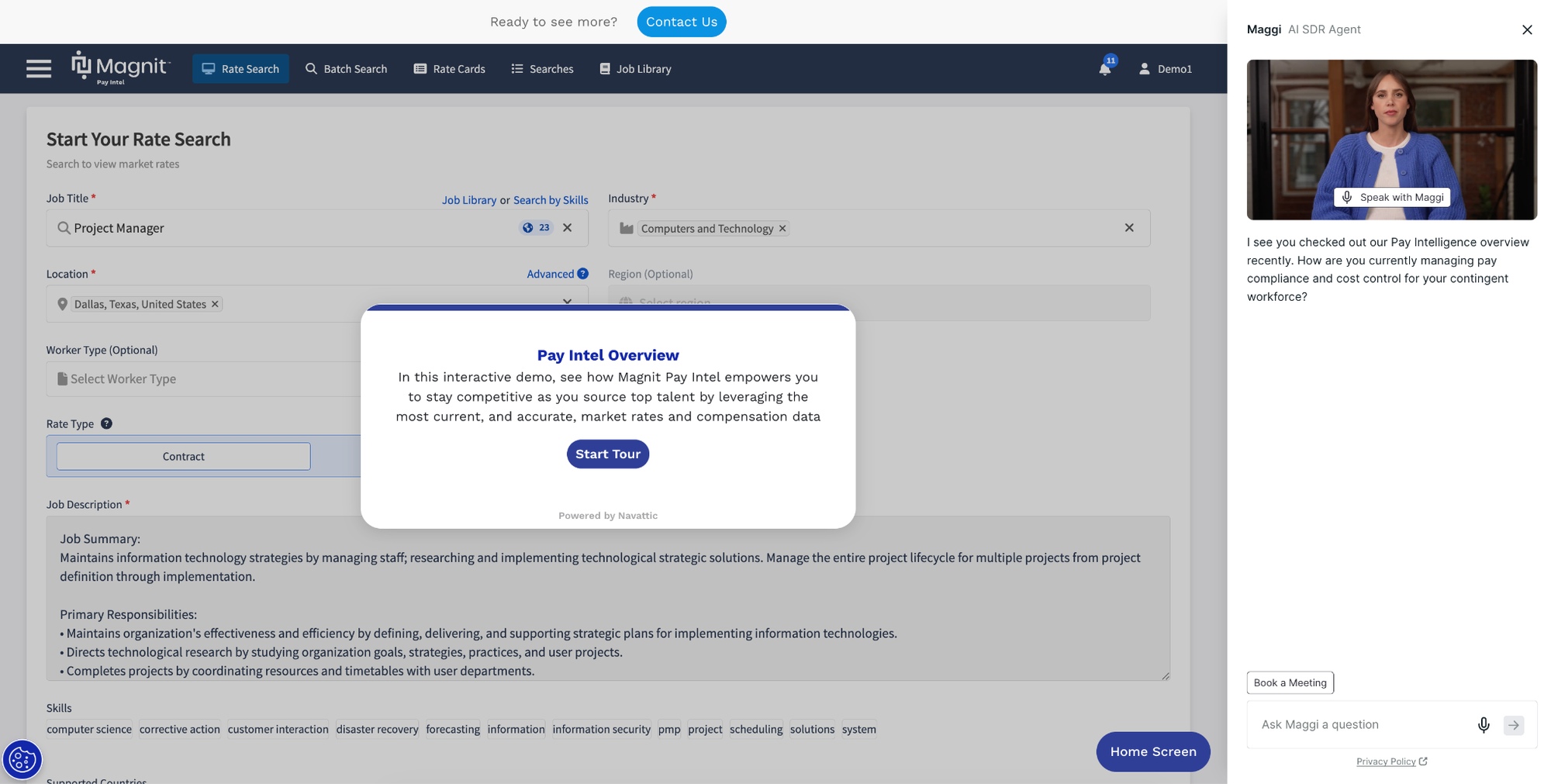
The Qualified agent opens on the right-hand side, available to answer specific questions that may not be addressed during the demo.
Bloomerang
Bloomerang, a cloud-based donor management and fundraising software, has a Qualified agent on their website that immediately gives visitors two ways to learn about the product:
- Booking a meeting with sales
- Checking out a product tour
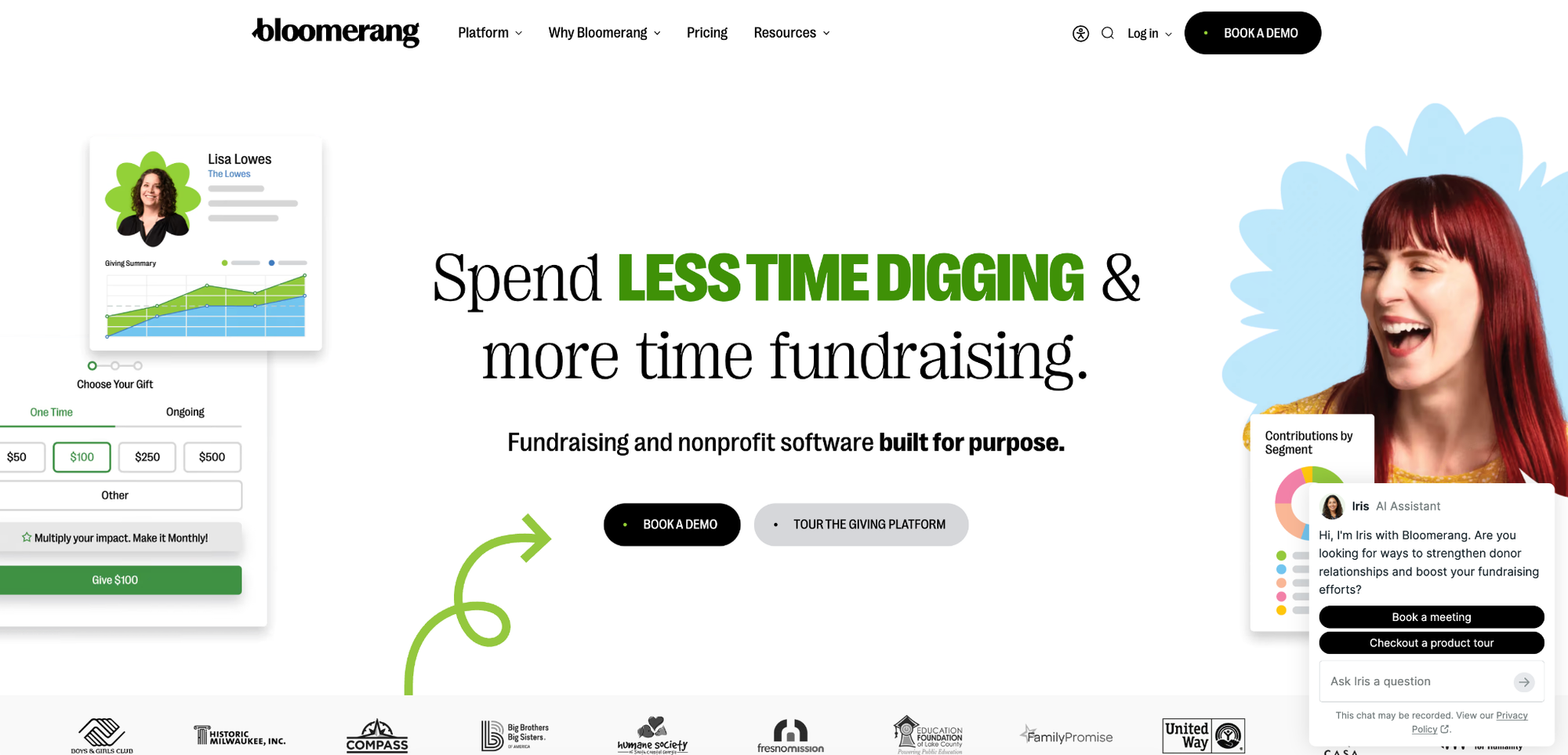
If a visitor clicks “Checkout a product tour,” the Qualified chat expands with a link to Bloomerang’s interactive demos.
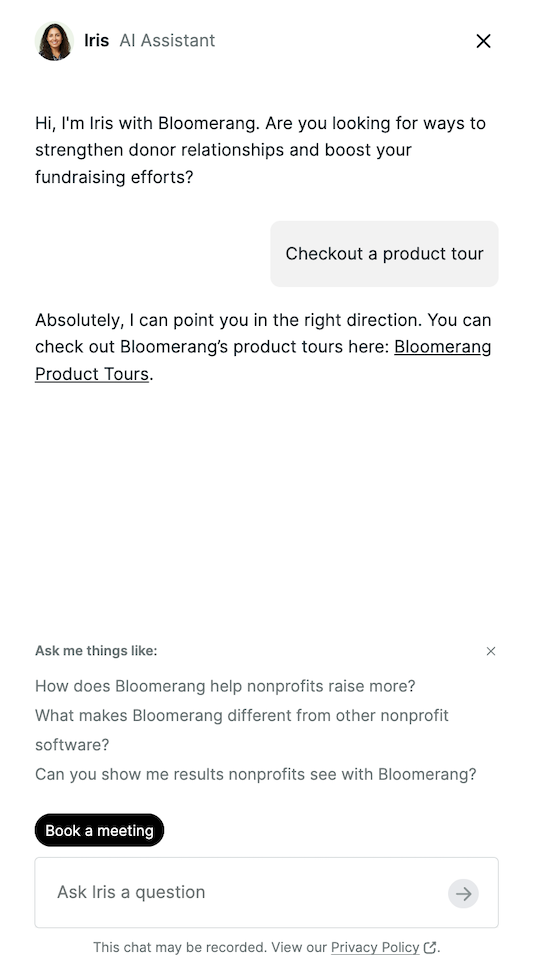
Currently, the team is running an A/B test in which the chatbot either provides a URL to a more standard guided tour or a Navattic agentic demo.
Combining Qualified with Navattic Agents
Navattic Agents are the next iteration of the interactive demo.
They converse with prospects, answer product-related questions in real time, and navigate your product autonomously, clicking, typing, and scrolling to show off key features.
Plus, you set the guardrails, so Agents don’t veer off into unfinished parts of your product or reveal pricing you’d rather keep under wraps. And every Agent answers from its Brain, the files, web pages, text, and flows you’ve added, so responses come from your content.
Navattic Agents work particularly well with a chatbot like Qualified because they act as a sort of extension of your AI SDR.
Rather than pointing prospects to a static tour and hoping it covers what they need, you can drop them straight into a demo you know will be customized to their needs.
As soon as a Qualified chatbot identifies buying intent, it can route a prospect directly to a Navattic Agent with all the context it’s already picked up from the conversation.
The Navattic Agent:
- Picks up right where the chat left off, so the visitor doesn’t have to re-explain anything.
- Tailors the demo based on the conversation, showing exactly what the prospect wants to see.
- Lets the visitor keep asking questions and getting answers in real time.
The Next Level: Replacing Qualified with a Navattic Agent
Pairing Qualified SDRs with Navattic Agents is an effective way to engage your prospects and show them your product in action.
Many people rave about Qualified’s Salesforce-native routing. And Navattic Agents have gotten praise for being multilingual and flexible, for use in “outbound prospecting, live prospect calls and conferences, and self-paced, hands-on experiences after a demo,” according to one G2 reviewer.
But for the two to work together well, you have to:
- Do the work of integrating them together.
- Feed each of them content (and, importantly, keep that content up to date in both).
- Pay for both tools.
If you’re looking for a single solution to qualify prospects and showcase your product, Navattic Agents might be a simpler, more cost-effective choice.
With Navattic Agents, there’s only one tool to train, one tool to manage. Add your content to the Brain once (files, web pages, text, and flows), then share it across agents or keep it private to one. Keep it current with a re-sync or weekly auto-refresh on any URL, and test before you go live with manual chat and Simulations, a saved suite of simulated buyers generated from the Brain.
Plus, Agents can save your sales team time by:
- Educating buyers who may not know what they want yet. SEs and reps don’t have to repeat themselves over and over about what your product does and whether it might be a fit – the Agent does that.
- Asking about company size, use cases, current tech stack, and priorities. Not only can that be used to weed out people who may not be a fit, funnel smaller customers toward self-serve pricing plans, and give reps useful context for a future live call.
- Showing off edge cases, which could be the difference between bouncing off your website and booking a call with sales.
Want to see Navattic Agents for yourself? Try one out.
Turn demos into deals.
Build interactive product demos that engage buyers and close deals faster.