How to Bring Your AI Demo to Life

The hard part about showing off your AI product or feature is that you never know exactly how it’ll perform live.
You could type the same exact prompt, walk through the same steps, and get a different result than you did yesterday – and that result may not be what you want a prospect to see.
Interactive or agentic demos mitigate that unpredictability, helping you show the best parts of your product every time.
Below, we share three tips for building interactive demos for your AI product, three places to use those demos across your funnel, and three examples of SaaS teams using AI demos to close more deals.
Why Interactive Demos Are the Best Way to Show AI Products
At least right now, demoing AI products is risky.
They can surface wrong answers, go off script, take a while to respond, or bring up weird edge cases.
Interactive demos let you control the pacing and keep outcomes consistent.
One of our customers used interactive demos to build out a whole experience center:
“We used Navattic to build out the Zycus Merlin Experience Center, a self-serve space where prospects can explore our agentic AI capabilities on their own time, without having to sit through a scheduled demo first,” their marketing manager explains.
“It’s getting people to actually engage with the product story before a sales conversation.”
In fact, according to our State of the Interactive Product Demo 2026 report showed that demos of AI tools have, on average:
- A 59% engagement rate
- A 40% click-through rate
Even if your product is changing a lot (which it probably is, if you’ve got AI features), it’s easy to make updates.
Navattic has HTML Captures, which means you can clone your product and edit the data, text, and styling. The best part is you only have to update it in one capture and it updates the data in your entire demo.
And with Magic Editor, that process is fairly simple:
- Find & Replace allows you to quickly replace all instances of a specific word, phrase, or image across an entire capture, saving you from having to make manual edits one by one.
- Table AI uses artificial intelligence to edit the content within your tables. Simply write a prompt describing the changes you want, and the AI will update the table for you.
- The Up-to-date feature automatically finds dates in your Capture and keeps them fresh relative to the current day.
Learn how to keep your product demos up to date.
3 Tips For Building an AI Demo
Because AI features are so dynamic, it can be hard to do them justice in more static Captures. But there are three ways to make your AI features look and feel real:
1. Use Animated Text to Simulate AI in Action
If your product has a chat-like interface for answering questions or a responsive terminal for writing code, people want to see exactly how AI responds.
But it’s tough to show that live – generated outputs are never the same twice.
And static before-and-after screenshots skip over the whole “thinking” part, making prospects skeptical that the feature is actually working.
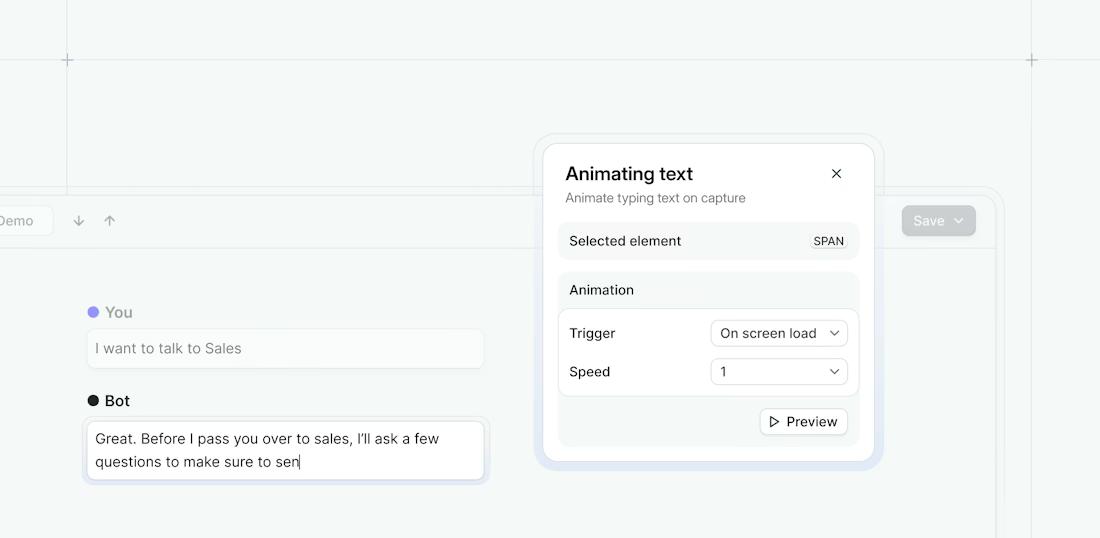
With Navattic’s Animating Text Magic Editor, you can make it look like someone is typing in a question or coding prompt and seeing an AI-generated response appear right in front of their eyes.
All you have to do is:
- Highlight the “typing” text you want to animate in your Capture.
- Click Magic Editors → Animating Text → Apply Animation.
- Pick your trigger. For example, “On screen load.”
- Adjust your speed. It should be fast enough to feel snappy, but slow enough to read.
- Preview the step to make sure it looks natural.
- Repeat for the AI-generated response.
2. Insert pre-built videos or GIFs into your demo
Some AI features are just too complex or too unpredictable to simulate with screenshots or animated text.
Things like agentic workflows running across multiple tools, AI voice conversations, or generative outputs that are more visually dynamic, like images, videos, or charts.
To show those off, we recommend embedding a short video or GIF directly into your demo flow.
That way, buyers get to watch your product do the most impressive things end to end, exactly the way you want them to see it.
3. Use Narrated Demos to Build Your AI Demo
When someone’s clicking through your product on their own, they may not pick up on certain nuances that you want them to.
To make sure that they’re picking up on every cool part of your AI feature, reps or SEs can talk through your product live, using speech-to-text to build the perfect demo while offering your prospects a voiceover as they learn.
Simply:
- Create a Narrated demo.
- Open the Navattic Chrome Extension.
- Select a microphone for recording.
- Navigate through the application like you’re giving a demo. As you capture each screen, speak your narration aloud.
- End the Capture session.
From there, Navattic Copilot will use the audio and Capture timestamps to create a synchronized experience.
Narrated demos are great for agentic features because you can narrate over parts where the model is thinking, searching, and summarizing.
You can edit those sections, too, cutting them down and cleaning up filler words.
If needed, you can also convert your Narrated demo into a stripped-down version that doesn’t have narration.
Note: If you cater to international buyers, you don’t have to manually create separate demos for each market. Just use Navattic’s Translations feature to support multi-language demos in your global campaigns and automatically translate AI voiceovers or avatars.
Where to use an AI interactive demo
Once you’ve built an AI interactive demo, it’s time to get it in front of buyers. Here are three places to put yours:
1. On your website and in marketing campaigns
AI product websites all sound the same right now. “Streamline your workflows,” “unlock team productivity,” “accelerate decision-making,” “automate your busywork.”
These buzzwords don’t tell prospects what your product does. An interactive demo is the fastest way to answer “What does this product do for me?”
To make the demo as concrete and useful for prospects as possible, we suggest anchoring it in a real workflow or outcome.
That matters even more for flexible, multi-use products, where buyers could use your tool a hundred different ways.
As Tiffany Hsia at Notion put it, “We have what I’d call a unique challenge in that we are a very horizontal product. We connect all knowledge, workflows, projects, and AI into a flexible tool users love. Some users refer to Notion as their second brain.
That’s hard to describe. So instead of telling people about Notion, we decided to show them. Interactive demos became our way to let potential users experience our product firsthand.”
2. For product launches
Normally, you’d launch a new product with a sizzle reel.
But as we’ve seen over the past few years, AI moves quickly. Which means every time you finish a product video, you’ll have to re-record it a few months later – and remember to replace it in every email nurture, blog, and docs page.
“Just as we finished with the perfect demo, we’d get hit with a new AI capability. Every time we recorded a demo, it felt like we were hit with a built-in expiration date,” Joann Ng at ActiveCampaign shares.
Interactive demos don’t have that hard expiration date.
You can swap Captures, videos, and GIFs in and out, rewrite Tooltips, and customize beacons in a matter of clicks.
Navattic’s Magic Editors even allow you to make edits in bulk:
- Find + Replace replaces all instances of a specific word, phrase, or image across an entire capture
- Table AI uses AI to edit your data based on your prompt (e.g., make all these accounts edtech companies)
- Up-to-date finds and adjusts old dates to the current day
Those changes will appear wherever you’ve already linked to or embedded your demo.
That flexibility is how Joann’s team built 23 product tours in just three months. “It’s something that would have been impossible with our old video recording process.”
3. In the sales cycle
Sending an interactive demo ahead of a sales call lets prospects explore your AI product on their own.
By the time they hop on with your team, they already understand how the product works.
Instead of wasting time covering the basics, SEs and AEs can jump straight into a more detailed discovery or show the prospect a feature that complements what they already saw in the demo.
Emily Casaccio’s team at Haloo took this approach to launch a new AI product in a legacy-dominated industry:
“We created a comprehensive ‘master demo,’ broken into targeted flows for different use cases. We distribute these to prospects before sales calls and at conferences, which has completely transformed our demo approach.”
Sharing the ‘master demo’ with prospects makes it obvious who isn’t truly interested in the product, improving qualification and deal probability.
It’s also made sales calls more targeted and productive: “In the sales call itself, we can say, ‘I see that you spent a lot of time looking at comprehensive search. I would love to talk to you about that.’”
Top examples of AI demos done right
When building your first AI demo, it can help to have some inspiration. Here are three AI demos to model yours after:
1. Okteto
Okteto, a developer platform, uses Navattic’s Animating Text Magic Editor to make it seem like their product responds to user commands.
For example, in one step, it asks users to type “okteto up” into the terminal.
As soon as the user does this, it looks like the app is starting to spin up an environment. In reality, the Okteto team animated the response and adjusted the timing so that it looks realistic.
This approach is paying off. Ramiro Berrelleza, Founder and CEO at Okteto, emphasizes:
“I’m a big fan of how Navattic handles code-centric experiences specifically. Once we added interactive demos directly to our landing pages at Okteto, the difference was immediate. And the data backed it up.”
Check out all of Okteto’s Navattic product tours →
2. Dremio
Dremio, an open data lakehouse platform, uses an interactive demo to show how its AI agent answers complex data-related questions.
The demo on their homepage, for example, opens with a common challenge for their ICP: how do you make sense of a dataset with over a billion rows?
In the demo, the user asks Dremio’s AI Agent to provide an overview of the data. As soon as they click submit, typing bubbles appear to indicate that the agent is scanning the metadata.
A few seconds later, an overview of the path, schema, notes, and potential exploratory next steps starts to populate.
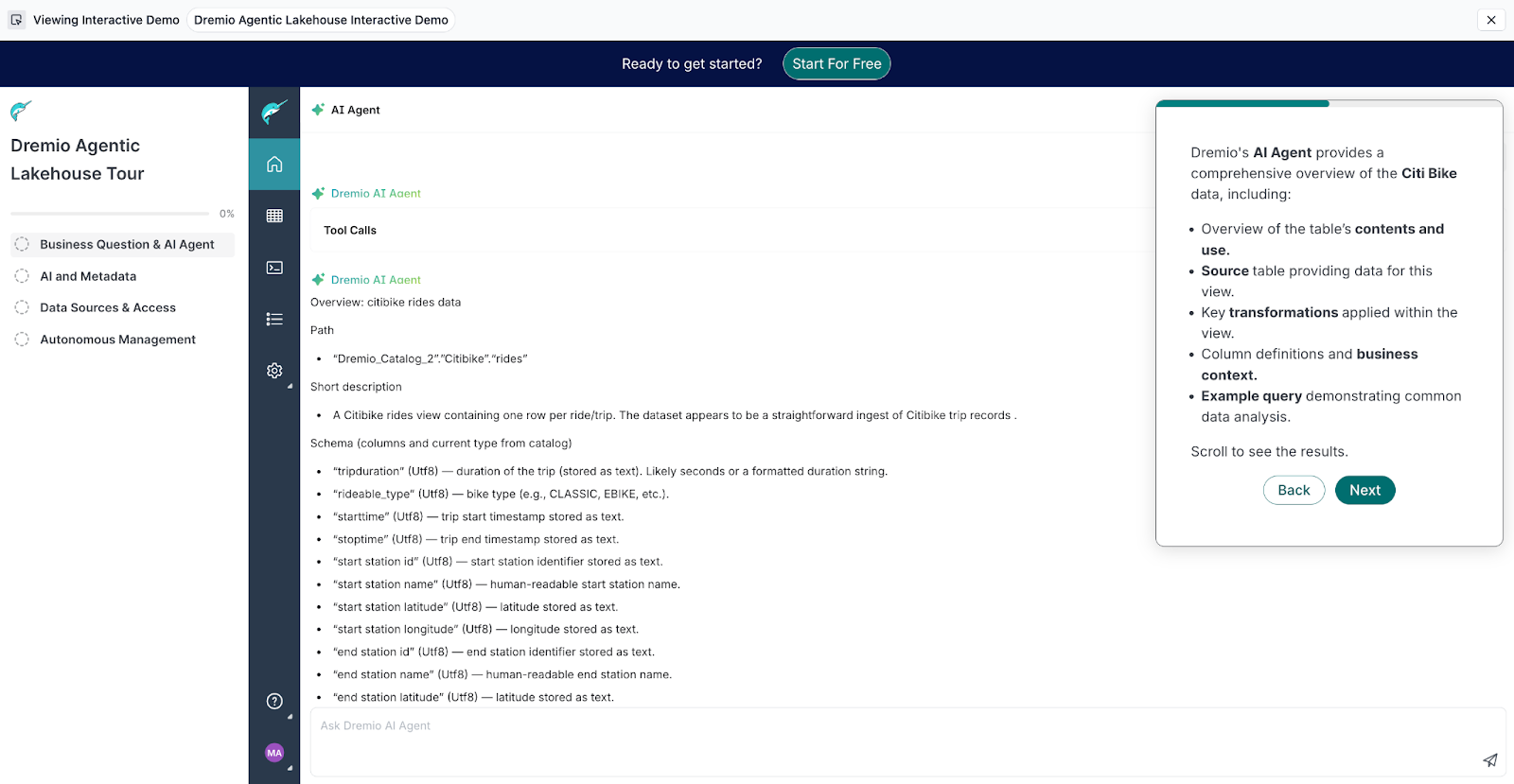
Throughout the demo, users can ask the agent more advanced questions, like: “Can you analyze hourly Citi Bike ride patterns and show it in a line graph?”
Grounding AI demos in specific, recognizable use cases, like Dremio’s, is what makes your product’s value concrete for a buyer.
3. Notion
An interactive demo was especially useful for showcasing Notion’s Enterprise Search feature.
They framed the demo around a common scenario for managers: prepping for quarterly reviews.
A manager types the prompt “What projects is Renee working on?” into Notion AI. Then, the agent “thinks,” “searches,” and “summarizes” results from GitHub PRs, Jira tasks, and Slack conversations to help the user write a detailed, data-backed review.
And this is only one of Notion’s demos. They have a dedicated demo hub with separate tours for different segments of their ICP so no one is forced down a single path that may or may not apply to their day-to-day.
For instance, one shows an agent turning a brainstorm into a product roadmap, another shows an agent creating a marketing research report.
Check out all of Notion’s Navattic product tours →
Build your first AI interactive demo for free.
Turn demos into deals.
Build interactive product demos that engage buyers and close deals faster.