6 Ways to Use the Navattic MCP

We’ve heard from users that demo maintenance and analytics can be some of the more manual parts of working in Navattic, so we built a way for them to spend less time on upkeep and more time refining and polishing their demos.
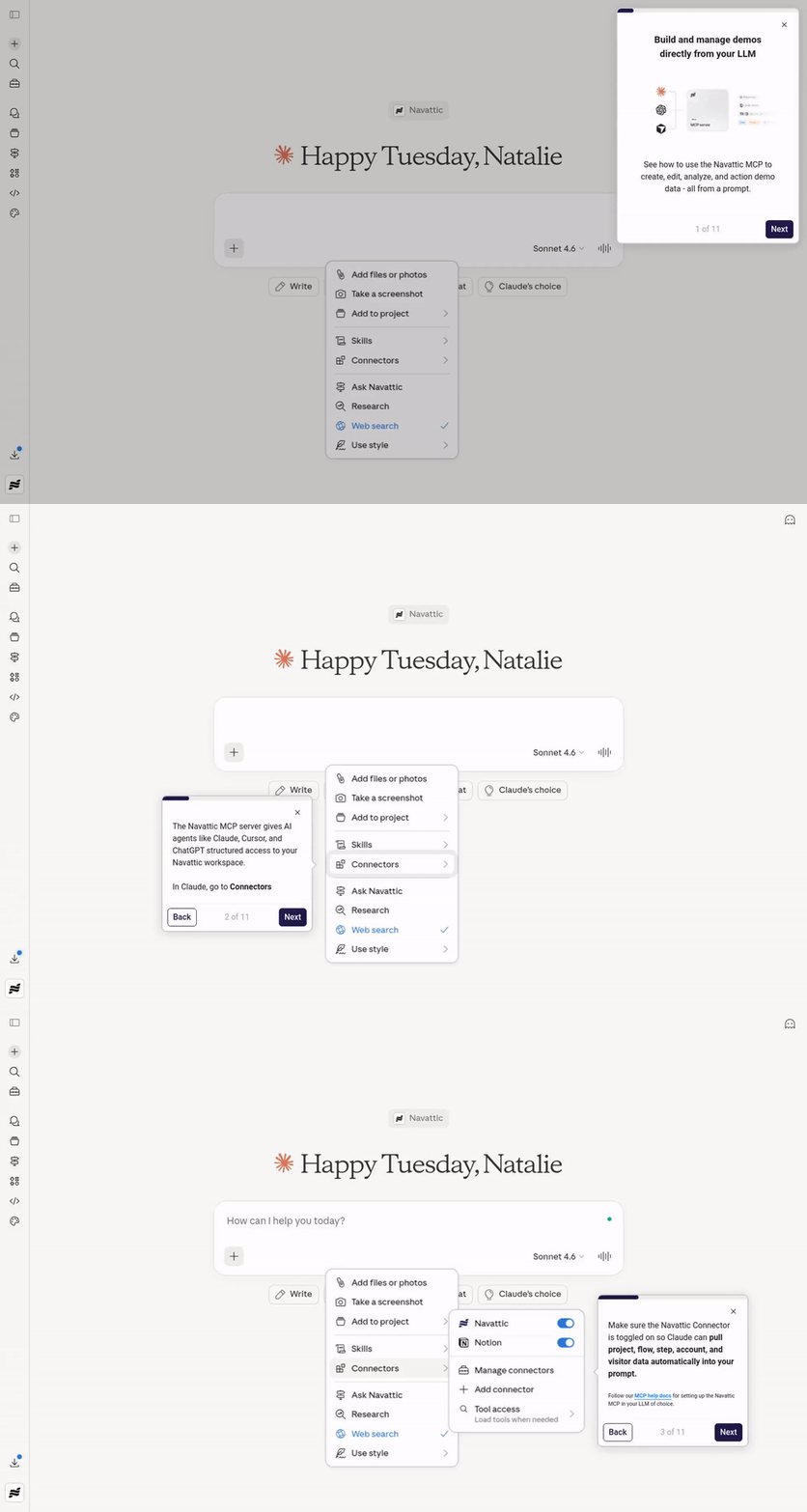
The Navattic MCP server gives AI coding agents and tools – such as Claude, Cursor, and ChatGPT – structured access to your Navattic workspace.
Which means they can do everything from browsing your existing demos, seeing the top leads going through your demos, to querying visitor data and mining your analytics for helpful insights.
In this post, we’ll share six high-impact use cases to get your wheels turning, with real examples from early beta users, including some specifically designed to speed up demo building and the sales cycle.
What is the Navattic MCP?
If you’re not already familiar, MCP stands for “Model Context Protocol.” Model Context Protocols give AI tools structured access to an external system.
With the Navattic MCP, you can connect your Navattic workspace to Claude, Cursor, ChatGPT, whichever LLM you prefer.
Once it's set up, you don’t have to click through the Navattic UI to create and edit demos, review your demo analytics, or pull visitor engagement data, you can just prompt an LLM to do it for you.
Want to jump right in? Head to our MCP server docs.
1. Use the MCP to Build and Edit Demos
Demos constantly need tweaks. To step copy, to CTAs, even to add new elements, like voiceovers.
Rather than logging into your workspace and clicking through the editor to make those changes, you can prompt Claude or ChatGPT. Through the Navattic MCP, you can adjust:
- Step titles
- Step content
- Buttons
- Navigation
- Beacons
- Anchors
- Voiceovers
- Presenter settings
And more – the MCP can take up to 45 actions on your behalf.
Before the LLM makes any changes, it’ll use the get_flow_document tool to read your flow in full.
It’ll also use the get_workspace_knowledge tool to pull workspace product context, go-to-market context, and brand voice, so changes stay on-brand without you having to reiterate style guidelines with every prompt.
You can even connect it to existing Claude Skills you’ve built to give it an even better understanding of your brand tone and voice, or how you position and describe your product.
Note: In its current state, the MCP can’t take new captures or screenshots. You’ll need to take captures first with our Chrome Extension or use a 3rd party agent like Agent Browser or Playwright to take screenshots.
See a demo of Navattic’s MCP →
2. Analytics Reporting Without Logging In
Growth and demand gen managers may spend a lot of time in Navattic’s Analyze tab.
There, they can see which interactive demos are attracting visitors, how far those visitors get in each demo (and whether there’s a consistent drop-off point), and how their demos influence pipeline and revenue.
Pulling that data is straightforward – just find the right dashboard, filter, and export to CSV. But it’s still a few clicks every time.
Now, with Navattic’s MCP, they can ask Claude or ChatGPT to generate a report with a simple prompt, like:
- “Which of our demos got the most engagement last quarter?”
- “Pull a list of visitors from companies with 200+ employees who viewed our [insert feature] demo in the past month.”
- “Which cybersecurity accounts have the highest total engagement across our demos?”
In the background, the MCP is using several tools to source and compile this information:
- list_demo_analytics, which responds with demo views, visitors, engaged sessions, duration, CTA clicks, and CTR.
- list_visitors, which shows visitors who have interacted with demos, with filtering by demo, company, location, device, and custom properties.
- get_visitor, which delivers a detailed profile for a specific visitor, including their 25 most recent sessions, conversion events, and demos viewed.
- list_accounts, which provides a list of company accounts with engagement metrics, with firmographic filtering by industry, employee count, revenue, and more.
- get_account, which gives a detailed profile for a specific company account, including visitors, demos viewed, and total engagement duration.
Example: A/B Testing Demos
One beta user ran a performance report across six new tours they’ve been A/B testing. With the MCP, they surfaced who viewed each and exactly where in the demo they converted.
“Super excited to get access to the MCP and start playing around. It had no problem accessing the 6 new tours and building the report. I asked it to include a list of the Accounts that have viewed the tours.I tried another prompt that needed get_visitor, and then got step-level conversions for that visitor. I am going to continue finessing this report and then automate it quarterly!”
Example: Automating Weekly Updates
Our Head of Growth and Product Marketing, Natalie Marcotullio, uses the MCP to build her updates for Friday all-hands meetings.
“I already had a [Claude Code] Routine that scrapes Slack for the top leads that came in this week (by company size and ICP fit) and summarizes for me. I’ve added to that Routine to look at which of those leads engaged with an interactive demo and call out the demo.”
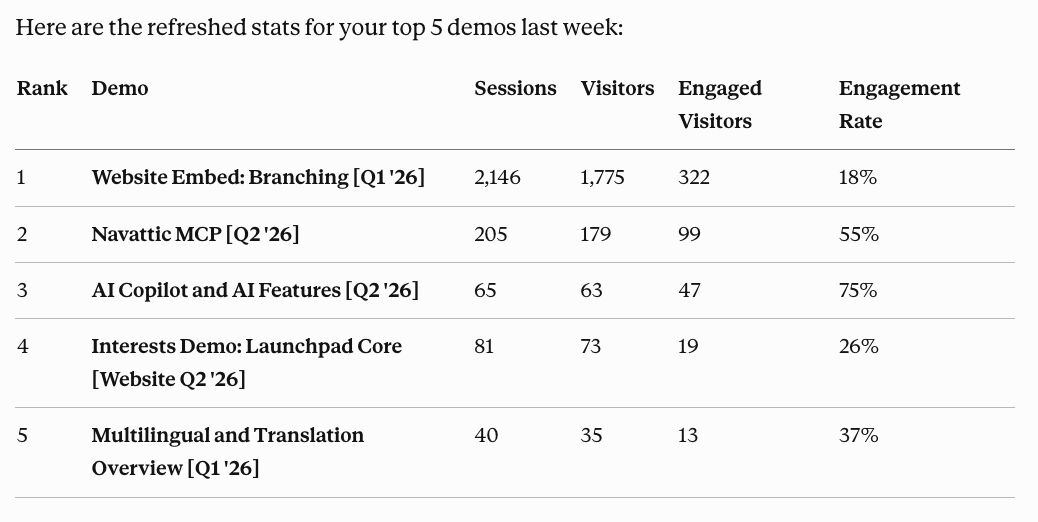
She also uses the Navattic MCP to pull the five top-performing demos of the week (along with which accounts engaged with them) and includes them in her report.
3. Prompt-Driven Demo Refresh
Your product is always changing, which means your demos have to change with it.
Remembering to update your demos – and setting aside time to actually make those updates – is tough, particularly if you have a large library.
SEs and PMMs may track this in Navattic with Boards and Labels or in a separate spreadsheet or sales enablement platform.
But now, they can use AI to scan their Navattic workspace for demos with the oldest publish dates and prioritize refreshes from there.
For demo refresh prompts, the MCP uses:
- list_projects, which finds all the projects in your workspace
- get_project, which pulls the details, flows, and links for each demo (including last published date)
One G2 reviewer reports: “The new MCP for integration with Claude is great news, and it’s nice to see it added without sacrificing ease of use.”
Example: Refreshing High-Traffic Demos
“If you build a lot of demos, you’re naturally going to run into situations where they become outdated and inaccurate, but still get traffic,” says Jason Oakley, Founder of DemoDash.
“These are perfect candidates for a simple refresh, to make sure that website visitors or prospects aren't getting shown the wrong thing, or the wrong messaging.”
As part of his beta test, he’s hooking up Navattic’s MCP to Claude and asking:
“Which of my interactive demos are consistently getting traffic, but haven't been updated in more than 60 days?”
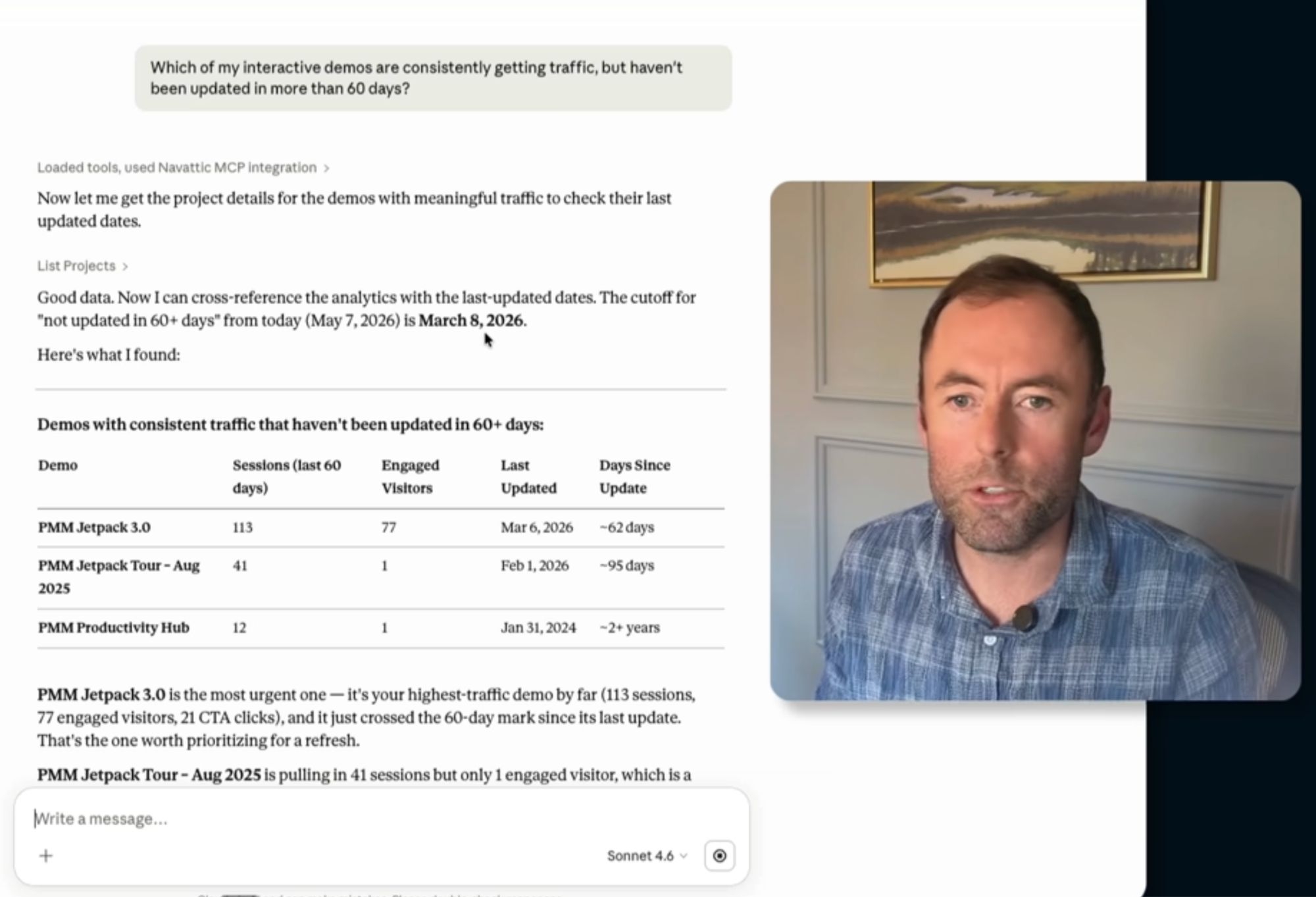
Claude suggests which ones to update first (high traffic, longer time to update).
He advises combining those results with your judgment – for example, maybe you know that certain demos feature parts of your product that recently underwent UI changes – to nail down which ones need immediate attention.
Example: Building a Digital Asset Management System
Another beta user is hoping to build an entire DAM (digital asset management) system, stitching together data from Jira, Figma, and the Navattic MCP to flag which demos need a refresh when a new feature ships.
“We use Navattic primarily for enablement, and our library of demos is gigantic,” they explain.
“Whenever our product is updated, we need to update a ton of content, even besides just our demos. It’s very daunting keeping track of what content touches what parts of our product and to determine what exactly needs to be updated.”
To overcome this problem, they’re using AI to analyze videos, images, courses, and interactive demos to summarize what happens in each one, what it looks like, and which UI elements it features.
That way, when a product update is slated to happen, an agent can:
- Grab relevant information from Jira, Figma mockups, screenshots, and docs.
- Scan through the database to identify what content needs to be updated.
- Give suggestions on how and where to update it.
Because the Navattic MCP provides the last published date, agents can triage the demo backlog, ensuring the team updates the oldest demos first.
“I tested the MCP out last week, and it’s going to work great for the agentic system I am looking to build.”
4. Demo Scripting From Existing Top Performers
Some demos just knock it out of the park, keeping visitors engaged and prompting them to book a call with sales.
Those are the demos you want every other demo to emulate.
But new demo scripts usually get written from scratch or from memory, without a systematic way to learn from what’s already working well.
Now, demo builders can use the MCP to prompt their LLM of choice to pull top-performing demo flows and use their structure as a template.
For demo scripting prompts, the MCP uses:
- list_projects, which finds all the projects in your workspace
- get_project, which pulls the details, flows, and links for each demo
- update_step_content, which writes step text in a new demo
This way, you don’t ever have to paste in a reference script again. Your best demo copy is the reference.
Plus, when writing, it’ll automatically pull in context you’ve already shared with our AI Copilot. Or if you’re using Claude, you can connect any internal company Skills.
Example: Automatically Drafting Internal Demo Builds
At Navattic’s last offsite, Natalie worked with a few team members on a Claude Code Routine.
This one turns a Linear project into an optimized interactive demo script, using the structure from top-performing demos and weaving in best practices from our State of the Interactive Product Demo report.
To request an internal demo build, an engineer can now:
→ Add a tag to an existing Project in Linear.
→ That will automatically create a new Linear ticket for Navattic’s internal demo builders.
→ Claude will write a first draft demo script based on the ticket context and the style, tone, and format of Navattic’s top demos.
5. Surface the Right Demos For Sales in Launchpad
Reps waste a lot of time digging through demo libraries trying to find the perfect demo to send to a prospect.
With the Navattic MCP, they can just ask Claude or ChatGPT.
In the background, the MCP uses the following skills to pinpoint the right demo based on the prospect’s use case(s), role, and deal stage:
- search_projects, which finds Launchpad projects by name or description
- search_interest_flows, which finds Launchpad interest flows, specifically, by their name or description
- create_launchpad_share_link, which generates a trackable, sharable link for the AE’s intended recipient
Example: Combine With Your Call Recording MCP
If Claude is already connected to Gong or a similar tool, reps could say, “Based on my demo with prospect XYZ, please recommend a follow-up demo.”
After Claude sends its recommendation and the rep sends the demo out to their prospect, they can come back to Claude and ask who engaged with the demo and how.
It’ll then use the get_share_links tool to grab details for a specific project share link by ID and the list_launchpad_share_links tool to reveal all Launchpad 1-1 share links in the workspace, with recipient and engagement data.
For more ways to get your sales team sharing demos, see our guide to rolling out demo automation.
6. Intent Signals For Faster Outreach
Navattic demos capture high-quality intent signals your AEs can use to tailor their outreach – if they remember to look at it.
With Navattic’s MCP, you can pull visitor activity from target accounts directly in Claude or another LLM.
For intent-related prompts, the MCP uses:
- list_visitors, which shows visitors who have interacted with demos, with filtering by demo, company, location, device, and custom properties.
- list_accounts, which provides a list of company accounts with engagement metrics, with firmographic filtering by industry, employee count, revenue, and more.
- get_account, which gives a detailed profile for a specific company account, including visitors, demos viewed, and total engagement duration.
Example: AE Alerts in Slack
Nick Bennett, a 6x Navattic user, is using Navattic’s MCP to set up a Slack alert for AEs.
“An AI agent pulls visitor activity from target accounts. Filters for high-intent behavior. Pushes an alert to Slack with context before the signal goes cold.”
For his workflow, he’s counting “high-intent” behavior as:
- Viewed pricing or integration flow
- Returned to the same demo twice in 7 days
- Multiple people from the same company viewing different flows
- Spent 3+ minutes in a product walkthrough
The alerts themselves include the visitor’s name, role, and company, the demos they viewed, how many steps they got through in each demo, and any CTAs they clicked.
This gives reps a sense of the use cases the prospect is focused on so they can reach out with the right message as soon as a lead expresses interest.
Example: Automatic List Building
Saad Khan, Director of GTM Engineering at trumpet, is accelerating pipeline with the Navattic MCP.
He’s using Claude to:
- Determine who is visiting an interactive tour, and what pages they viewed
- Push visitors from target accounts to a Skill that enriches those contacts with Apollo data
- Drop those contacts into Clay for a live enrichment score, OR push them directly to Apollo’s sequencer to take action on that day
“That’s where I see the most joy with MCP,” he shares.
“Combining and stacking multiple different data sources and signal sources to generate ‘warm’ pipeline. Engagement is some level of awareness, and awareness is some level of intent.”
Want to start using the MPC? Check out our MCP Skill Library with 16 ready-to-use skills.
Turn demos into deals.
Build interactive product demos that engage buyers and close deals faster.